Your Input Matters
Review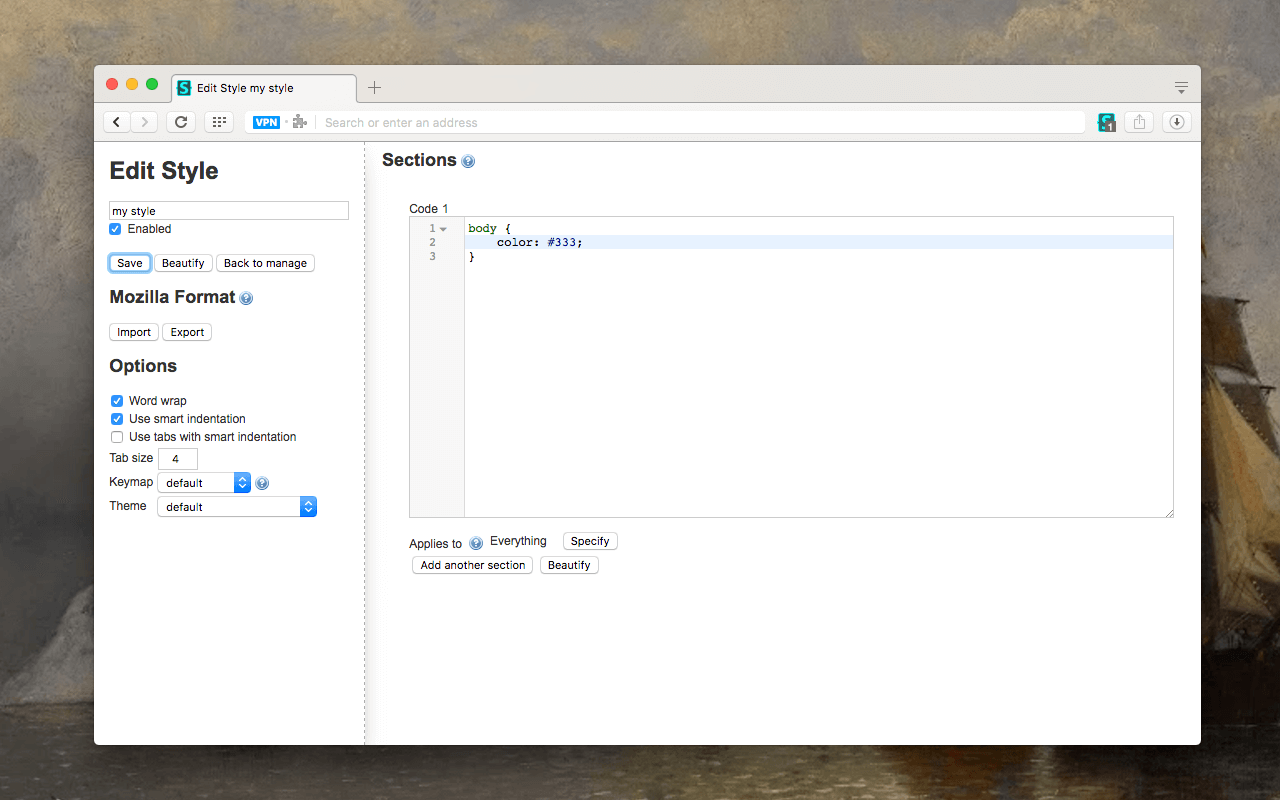
| Advertisements |
What is the "Stylus" extension and how does it work?
Stylus is a userstyles editor and manager based on the source code of Stylish version 1.5.2. Our objective is to maintain and improve upon the original author's version, while becoming more privacy oriented and remaining more user-friendly for style creators.
Stylus injects its own CSS into targeted pages and therefore makes you able to override the present design of a webpage. If you know CSS, you can write and create your own styles. Otherwise you can just install styles by other authors from userstyles.org (USO). You can also search for styles for the current site on USO from within the Stylus extension.
Stylus browser extension is available for Chrome, Firefox and Opera browsers.
What are the main differences and improvements over the original Stylish add-on?
1.) Any and all analytics, telemetry, and data-collection have been removed completely. We'd rather not know what you're up to.
2.) A backup feature, compatible with the one recently introduced in Stylish. To transfer your database, simply export from Stylish and import to Stylus.
3.) An automatic update feature for installed styles. You can now set your own interval for all installed styles to automatically update on their own, silently in the background.
4.) CodeMirror and CSSLint have been updated to their latest versions, respectively. Many false positive editor warnings and errors have been improved via the update, and we've added a few extra exceptions for some other common false positives.
5.) Customizable badge color for the icon. You can now specify what color you'd like the badge to be for "enabled" and "disabled" icons.
6.) A new icon state, which indicates when all styles are globally disabled.
What is new in this version?
Please check the log section in this page to find-out the recent changes. For more comprehensive list of changes, take a look at the GitHub's commit section.
How can I contribute to this extension?
PR's are welcome on Github https://github.com/schomery/stylish-chrome/issues, and you should also report any bugs you come across by opening an issue there. Participation in any form is encouraged, so feel free to browse through the issues and share your thoughts. If you're interested in lending your assistance to expedite any future progress, pay special attention to any issues labeled as "help wanted". To contribute to translations for the Stylus UI, visit transifex at https://www.transifex.com/github-7/Stylus/.
Otherwise, if you prefer a more informal method of getting in touch or starting a conversation, please leave a comment here on the discussion section. We will monitor any discussions here and join in, and it may be a more appropriate venue for opinions and less urgent suggestions.
How can I export my user styles from Stylish for Firefox add-on?
Please follow the instruction in the wiki
[Deprecated answer] Stylish for Firefox add-on does not support exporting to the JSON format at the moment. For now, use the following experimental extension to generate Stylus compatible JSON file.
On successful conversion, you will get a JSON file on your desktop. This file can be exported to the Stylus add-on. Note that Stylish add-on needs to be enabled in order for the extension to be able to read Styles.

Please keep reviews clean, avoid improper language, and do not post any personal information. Also, please consider sharing your valuable input on the official store.

Change Logs:
|


| #2177 |
| ||||
| #2172 |
| ||||
| #2161 |
| ||||
| #2152 |
| ||||
| #2147 |
| ||||
| #2140 |
| ||||
| #2135 |
| ||||
| #2086 |
| ||||
| #2072 |
| ||||
| #2069 |
| ||||
If you tired of the same old look of your web and to give it a new and stylish look, stylus add-on is the ideal one for you. It is the best add-on of its kind, which you can restyle your web. This add-on was created with the aim to make it provide the users an easy interface to make their browser more stylish and pleasant to look at.
Stylus add-on is supported by multiple browsers i.e. Chrome, Firefox, and Opera. It allows the users to install themes easily for numerous websites to change the look. It has a modern user interface which is easier to the user and boasts of various features that give it an edge over the various other similar extensions available on the internet.
Some other notable features associated with this amazing extension from Mozilla includes the backup feature (Chrome compatible) and customizable auto-update feature for styles. However, the user interface of the browser and internet pages cannot be restyled with Stylus due to the security restrictions in the WebExtensions platform.
On the whole, the positive features this add-on boasts of definitely outnumber the minor drawbacks it has, making it one of the popular and most used extension to be used for giving your web a new and improved look. This extension gives users and opportunity to design and style their web the way they want to in an easier way with its simple interface. The makers of this extension are open to your feedback and suggestions; you can notify them if you ever encounter a bug or have some ideas for improvement of this extension.
A browser profile is a collection of settings, bookmarks, history, and other information that is associated with a particular user or identity in a web browser. Each profile has its own separate storage and settings, so that different users can have their own personalized browsing experience on the...
What is a Chrome Extension A Chrome extension is a small software program that extends the functionality of the Google Chrome web browser. It adds additional features or functionality to the Chrome browser and allows users to customize their browsing experience. Chrome extensions can be developed ...
Windows Secure Boot is a feature that was introduced in Windows 8 and is designed to protect against malware attacks by preventing unauthorized operating systems and applications from loading during the boot process. How Secure Boot Works Secure Boot works by only allowing signed and trusted appl...
