Hi Creators!

Input Action System (IAS) is now fully released, with robust support for hardware bindings and action types universally available to support all your games :tada:. IAS unlocks a future where input on Roblox is modular, scalable, and cross-platform – you can build a shooter, driving simulator, or action game whose control schemes adapt on the fly if a player switches hardware mid-game, like plugging a Gamepad into their laptop. IAS also serves as a foundational pillar for our next-generation technologies like Server Authority and the Character Controller Library.
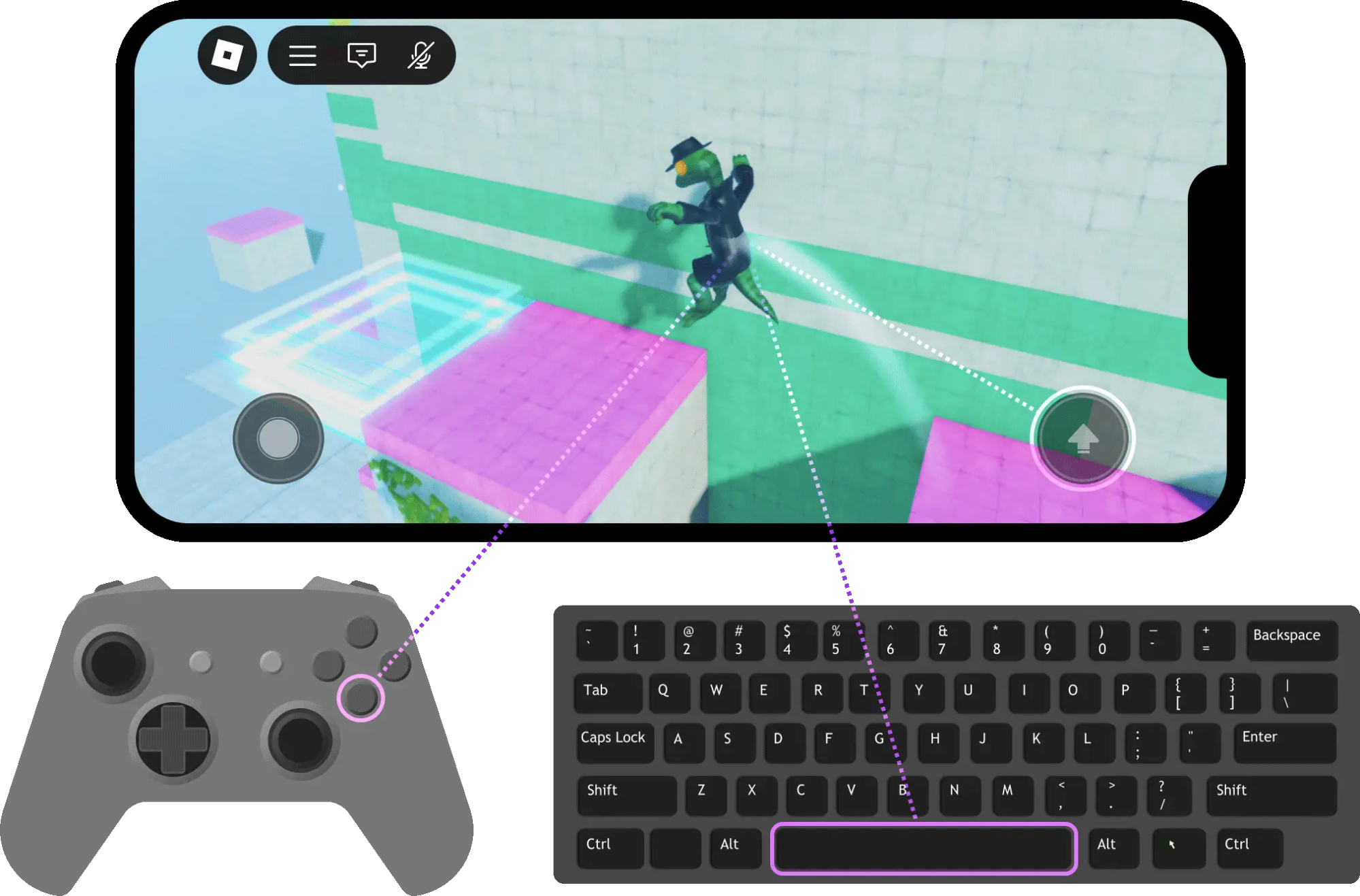
To bring cross-platform input to all games by default, we’re also officially migrating all default player scripts to IAS. The new player scripts are functionally identical while being simplified, modular, and integrated within our data-driven system. If you have custom input logic alongside the default scripts, you should audit your game to ensure the entire input ecosystem functions as intended with the new scripts. To give you ample time for this, we are introducing this as a standard three-phase rollout (see details below).

Check out our new video below that breaks down how and why we converted our default player scripts to IAS, and why you should adopt IAS for your custom input needs as well.

We’ll also host a live webinar on July 9th, 11am PST to answer any questions about the system or player script migration.

Keep reading to see what’s new to IAS since our last release and learn more about what you need to do to opt into our new player scripts today!


:brain: A Quick Refresher on IAS

IAS is a platform-abstract, data-driven input layer that decouples structural gameplay intent from literal hardware events. Instead of writing separate scripts for different input devices, you can now write a single piece of code that works across all of them.

IAS consists of three core instances:

  • :bullseye: InputAction: The gameplay mechanic a player intends to perform. Each Action has an InputActionType that determines the input type it expects to read in.
  • :keyboard: InputBinding: A hardware-specific input assignment. The input configuration should map to the associated action type.
  • :open_file_folder: InputContext: A grouping of related actions. Contexts can be enabled, disabled, and prioritized dynamically based on gameplay state.

For a more detailed walk-through, check out our step-by-step guide on how to start building with IAS. You can also reference our sample placefiles below:

:sparkles: What’s New Since Client Beta?

We’ve added some major new features landing with today’s full release.

Click here to view
  • Enhanced touch support: We’re introducing new touch keycodes that can be used as bindings for various action types! These include:

    • TouchPosition, which returns whether an active touch has occurred for a boolean action, or the raw position of an active touch for a ViewportPosition action.
    • TouchPinch, which returns the velocity of a two-finger pinch gesture for a Direction1D action.
    • TouchDelta, which returns the velocity of a one-finger swipe for a Direction2D action type.
  • UI Modifiers: We’re extending modifier key functionality to touch input through the new UIModifier property on InputBinding. Just like on other platforms, the primary touch binding will only fire if the assigned on-screen modifier is actively being touched.

  • Enhanced Pointer-Device Support: You can now read accurate, velocity-based directional values directly through pointer-device bindings. TrackpadPinch and MouseWheel bindings now seamlessly map to Direction1D action types, and TrackpadPan and MouseDelta bindings map to Direction2D actions.

  • Directional Input Clamping: We’re introducing ClampMagnitudeToOne, a new boolean property on InputBinding that caps composite directional inputs at a maximum magnitude of 1. This ensures that moving diagonally doesn’t give characters a hidden speed advantage over cardinal directions. It defaults to true.

  • Per-axis Multipliers: We’re adding Vector3Scale, a new property on InputBinding multipliers that provides independent scale tuning for Direction3D actions, similar to Vector2Scale. This is useful for 3D navigation like flying to fine-tune how fast a player ascends or descends compared to their horizontal movement speed.

We’ve also fixed a number of bugs to improve the quality and reliability of using IAS.

Click here to view
  • InputBindings now reliably reset to false when a cursor or touch is released rather than when the pointer leaves the bounding box of a pressed UIButton.
  • Analog inputs (like gamepad thumbsticks and triggers) that are sunk by the engine now correctly reset their action states.
  • Thumbstick directional keycodes now properly apply the ReponseCurve property correctly.
  • Passing a boolean input into a Direction1D action now correctly throws a runtime type-error instead of failing silently.
  • Highlighting or selecting a UI element via gamepad navigation now correctly routes button press signals into the IAS pipeline.

:joystick: Upgrading Default Player Scripts To Use IAS

We’ve migrated our player scripts to use IAS to provide default controls that you know and love! This adds native, highly modular cross-platform support out-of-the-box, as well as proper input sinking across all your InputActions.

Functionally, these new scripts behave identically to the legacy player scripts; there are no visual or mechanical differences for the default gameplay configurations for movement and camera. However, if you have built custom inputs for your game that worked alongside the legacy player scripts, you should audit your game to ensure everything continues to function exactly as expected.

:hammer_and_wrench: How to Opt-In

To switch your game over to the new player scripts, navigate to your Explorer panel and locate Workspace. In the Properties panel, locate and set the new PlayerScriptsUseInputActionSystem variable to Enabled.
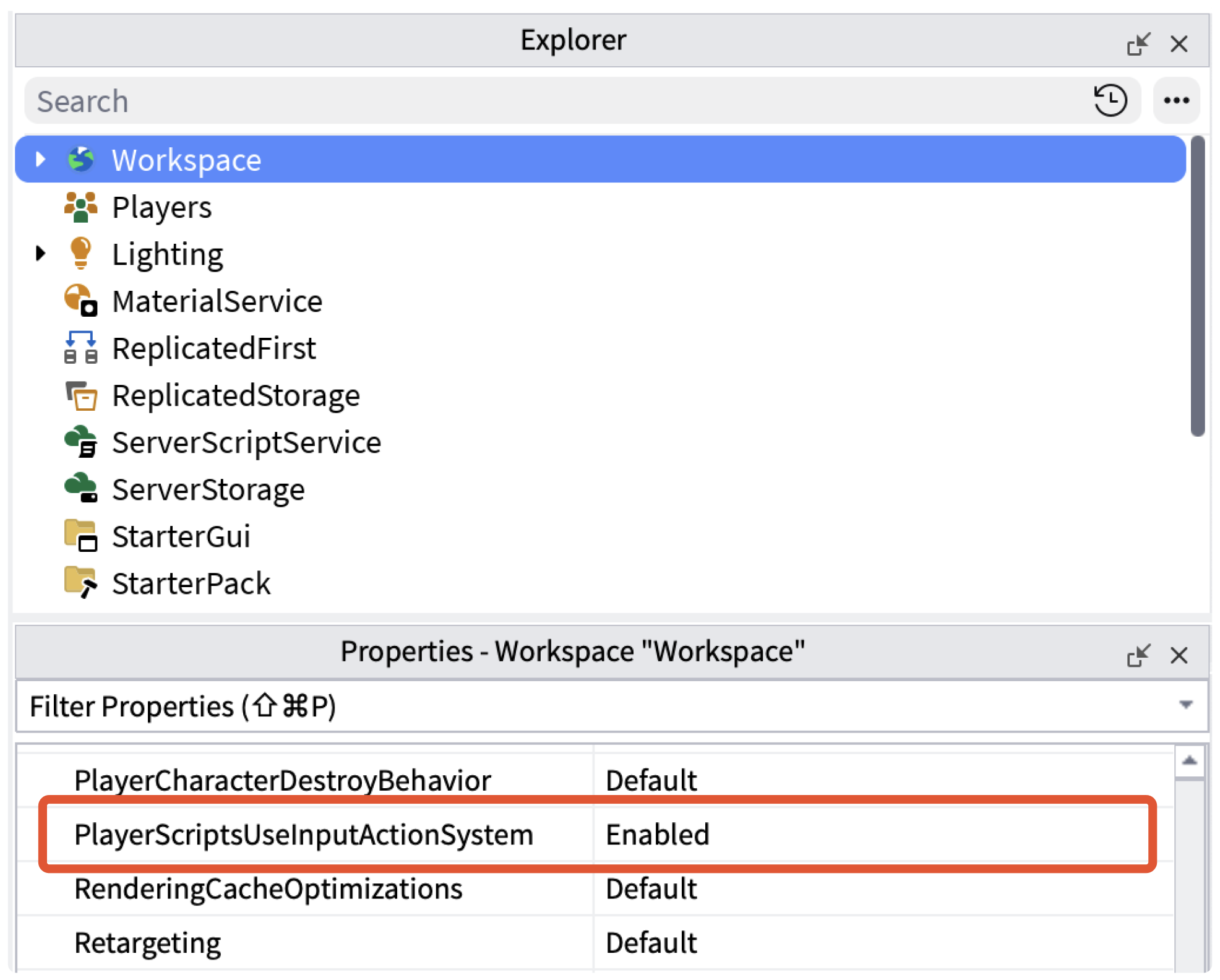
Keep the following in mind as you opt in to these new player scripts:

  • Server Authority / CCL Compatibility: If you have already been utilizing these player scripts for early Server Authority or CCL development, your flag should already be enabled, and no further action is required.
  • Forked Player Scripts: If you have forked player scripts and want to retain your custom controls, you still need to enable the Workspace variable above, then set StarterPlayer.CreateDefaultPlayerModule to Disabled. This is the new explicit mechanism to prevent the engine from overriding your custom player scripts at run-time. We strongly recommend testing your custom logic after going through these steps to make sure everything functions as expected.
  • References to Legacy Player Scripts: If your custom input code references internal methods within the legacy PlayerModule (e.g., GetControls()), you may need to update those scripts since those legacy endpoints may no longer exist. Since default player scripts are subject to future updates, we recommend avoiding direct dependencies on internal PlayerModule components.

This upgrade follows our standard three-phase rollout process for potentially breaking changes. We’ll share exact dates closer to each phase – before moving onto Phase 2, we want to ensure everyone has had ample time to audit their game. Please do not hesitate to reach out to us if you need assistance!

Three-phase rollout timeline

Phase PlayerScriptsUseInputActionSystem Value Creator Impact
Phase 1 (right now!) Default = Disabled No breaking change. Creators can opt-in by setting the Workspace variable to Enabled.
Phase 2 ETA: Early 2027 Default = Enabled Potentially breaking change. Games referencing the old player scripts, or relying on previous input sinking patterns, will likely break. Creators can quickly revert by setting the Workspace property to Disabled and re-publishing. Note: Opting out should be a temporary measure until you migrate your games. At this point, we will announce the Phase 3 timeline.
Phase 3 ETA: Mid 2027 Property is removed altogether All places (new and existing) will receive the new player scripts. The old player scripts will no longer be accessible.

:eyes: What’s Next?

As you adopt the new default player scripts and create with IAS, our team will be eagerly developing new features to make the system even better for you. In the near future, we plan to release improved Studio tooling to make auditing, verifying, and mapping your cross-platform bindings easier and visual. We are also actively investigating native frameworks to support player-side key remapping and input configurations with zero custom scripting required!

:blue_heart: Made with love

A massive thank you to @NoUniqueAddress, @AykeriZero, @runitbackrolfo, @SharpenedByWater, @MetaVars, @n3wr1ch, and @Astonish1656 for their incredible work building this foundational system, and a huge thank you to everyone who experimented, built, and provided invaluable feedback during our Client Beta phase :heart:

Please don’t hesitate to reach out if you have any questions about the full release or the new player scripts rollout. We are excited to see how IAS streamlines cross-platform input development for you. Happy building!

read 11 min

Opened on Jun 12

This topic was automatically opened after 10 minutes.

Instances are required for server authority so they can be predicted! Both the server and client need access to the instance. If you had binded inputs with a service like ContextActionService, only the client would be able to access it.

Hello, here’s a bug I’ve found with the new Input Action System Player Scripts:

When having a ProximityPrompt and using shift lock on top of them, you are now unable to turn your camera. Before, using shift lock on top of a ProximityPrompt will allow you to normally turn both your character and camera. Now you are unable to do either, this issue is reproduce-able on a default baseplate.

New PlayerScripts on Default Baseplate:

Old PlayerScripts on Default Baseplate:

Reproduction Place: (Uncopylocked)
https://www.roblox.com/games/90581149952142/Baseplate-for-Bug-Reports
Place File:
DevForumBugReport.rbxl (83.0 KB)

If needed, I can create a DevForum bug report for this.

cross-script access to the same inputs is a big factor imo - that way eg. you can have both your death script and your cutscene script disable movement

How do we get the input direction for mobile thumbstick? Is their an enum like there is for console thumbsticks?

I also have some other small concerns with the new Input Action PlayerScripts but they don’t require an entire bug report dedicated to them.
Is there anywhere appropriate I could forward all these too? Any chance we could get an engineer to go over a lot of these outdated PlayerScripts and optimize plus fix them up heavily? For reference, most of the experiences I work on rewrite the default PlayerScripts just to optimize and fix them up, and then update them whenever a new feature or update to the PlayerScripts roll out.

Examples of the small issues I’ve noticed:

  1. PlayerScripts not using the new Raycast API’s ExcludeInstances and IncludeInstances for better performant raycasts.
  2. PlayerScripts not using :QueryDescendants, Vector2.zero, Vector3.zero, Vector3.one, Vector3.yAxis, etc over manually creating Vector3s for small performance gains and not using the new +=, /=, *= keywords.
  3. Multitude of locations within PlayerScripts accessing game.Workspace or game:GetService("Workspace") over workspace for consistency sake.
  4. Multitude of locations within PlayerScripts calling deprecated :connect and :disconnect, :GetPrimaryPartCFrame, CFrame:vectorToWorldSpace and more.
  5. Multitude of locations within PlayerScripts accessing deprecated properties such as CFrame.p, Vector3/CFrame.y, Vector3/CFrame.x, Vector3/CFrame.z, BasePart.Velocity, BasePart.RotVelocity , Camera.CoordinateFrame and more.
  6. FlagUtil not being used for unified grabbing of FFlags in,
StarterPlayer.PlayerModule.CameraModule.TransparencyController StarterPlayer.PlayerModule.CameraModule.VRBaseCamera StarterPlayer.PlayerModule.CameraModule.VRVehicleCamera StarterPlayer.PlayerModule.ControlModule.ClickToMoveController (Despite being referenced and used, there's a few parts that call `IsUserFeatureEnabled` without using the FlagUtil function)

And just general bad or old code that isn’t really efficient or optimized.

Cheers for the warning. Will be saving the old PlayerScripts ahead of time so that ShiftLock is, well, still shiftlock in my games, not CtrlLock.

How do you map four UI Buttons to a Direction2D like you can with keyboard wasd or gamepad thumbstick1? Use case is vehicle control UI for mobile devices, I cant work it out… :melting_face:

Edit: It seems this is impossible currently…

This is one of those features I wish we already had in 2018 or something.
It’s wayyyy too useful to be released this late, years spending around messing with UserInputService.

Is there a possibility for gyroscope support to be added to IAS?
As it’s nice how with Steam Input you can quite literally give any game gyroscope controls, even if those games aren’t built with gyroscope support.

There’s no difference between Vector3.new(0,0,0) and Vector3.zero, they both compile to a vector literal in luau. Although Vector2s don’t because they’re userdata.
Although it should be using the vector library where possible, as its an easy way to get extra performance with code that uses vectors. As the methods on the vector library are fastcalled.

Could the input action system also be used for UI events?

Scripts appear to be running when they are in StarterPlayer, which is causing these warnings:

Also, the ActionController module has some noticeable typechecking problems that make it harder to read, especially the setupSlotActions method definition.

what would be the correspondent function in the new system for
Controls:GetMoveVector()?

Thanks

VRCamera seems to still use GetMoveVector despite that not being a function anymore;
image

Lines 275 and 366.

Thanks to the team! IAS has been such a great addition and I hope it keeps getting better

I’m not a massive fan of how there’s little design clarity on Roblox between what should be Services and what should be Instances, sometimes it just feels like it’s what ever they’re feeling that day.

However, this new system has been pretty good and has made multi input support easier in some ways, the team should be proud of what they’ve done and I generally think this design is a step in the right direction.

Hopefully it’ll lead the way for future talks in regards to what should sensibly be a service, instance or just a simple library.

I’m also noticing that RbxCharacterSounds is being forcefully replaced whenever this is on… surely not intended? I have a custom fork of the script for my game and PlayerScriptsUseInputActionSystem is replacing it. For now I can do a hacky workaround but either way thought it’d be worth pointing it out.

Big fan of SCP roleplay, and obviously not Roblox staff, but no, its not intended. It’s most likely a conflict with another script or a conflict with authority. It’s really new so there are probably conflicts they havent resolved

These being instances does seem to be the better option to me, primarily for clarity with server authority. Some of its benefits come down to personal preference, but I do find setting up inputs where it works to be a lot easier with this system as well. It also comes with the added benefit of input settings being entirely separate from our scripts, which is another part I like about it.

What’s the new way to disable and enable controls? ControlModule:Enable(false) doesn’t seem to work for me…

Currently tedious to try to map mobile joystick to an InputBinding. With thumbsticks you can just use the Thumbstick1Up keycode, with the mobile joystick you have to loop converting the humanoid move direction into local space. Even then that doesn’t accurately yield the direction of the joystick for all cases. How are we supposed to treat the mobile joystick similarly to the console thumbstick if we can’t map the joystick direction to input binding?

You should be able to listen to the input under the inputs folder with the new player scripts, right? I haven’t checked how it’s done yet, but I assume the mobile joystick code is manually firing the input every frame like the scripts do with the camera to send the camera look direction to the server.

IAS is still pretty awesome, but I still wish we could limit certain contexts to certain devices/controllers, that way we could make cool local multiplayer systems where when a group of people play with different controllers on the same device, they don’t all fire the same exact InputAction. Right now, the only solution is to fallback to UserInputService instead.

Unless I’m mistaken, hardcoding it is the only way- which kind of defeats the purpose of IAS, no?

Of course its possible, but novice scripters may as well be incapable of doing so regardless, due to how tedious it is. If IAS is meant to mix inputs it might as well support mobile inputs similarly to how thumbstick enums are mapped, otherwise developers would be subjected to fixing bugs every time player scripts are updated. Its also just not very obvious how to achieve that, there aren’t many forum posts covering the joystick- and none for mapping it to IAS, sadly most people solely rely on Humanoid.MoveDirection (which should not be used for actions in games such as steering vehicles or piloting aircraft).

That being said…
Treating the mobile joystick just like console thumbsticks requires you to match cardinal direction angles.

Its worth noting that in most games you could benefit from specifying an angle to blend cardinal directions diagonally (i.e. copying how W + A on a keyboard can activate two InputAction at the same time), 0 degrees being no blending mimicking consoles, 90 degrees always blending mimicking keyboards, and 45 degrees blending equally so as to mimic both. This angle can just be left at 0 by default.

local ReplicatedStorage = game:GetService("ReplicatedStorage") local RunService = game:GetService("RunService") local StarterPlayer = game:GetService("StarterPlayer") local Players = game:GetService("Players") local Player = Players.LocalPlayer local TouchUI = Player.PlayerGui:WaitForChild("TouchGui", math.huge) -- yields if not mobile -- Our personal Input Actions meant to bind thumbstick and joystick direction alike local Keybinds = ReplicatedStorage:WaitForChild("Keybinds") :: InputContext local Forward = Keybinds:WaitForChild("Forward") :: InputAction local Backward = Keybinds:WaitForChild("Backward") :: InputAction local Left = Keybinds:WaitForChild("Left") :: InputAction local Right = Keybinds:WaitForChild("Right") :: InputAction local Controls = StarterPlayer:WaitForChild("PlayerModule") local MoveAction = Controls.InputContexts.CharacterContext.MoveAction :: InputAction local Angle = 0 -- 0 = cardinal only, 45 = 8 equal sectors, 90 = heavy diagonal mixing local function angle(v) local a = math.deg(math.atan2(v.X, v.Y)) if a < 0 then a += 360 end return a end local function range(a, center, halfSize) local diff = math.abs(((a - center + 540) % 360) - 180) return diff <= halfSize end local function Components(name) if name == "Forward" then return {"Forward"} end if name == "Backward" then return {"Backward"} end if name == "Left" then return {"Left"} end if name == "Right" then return {"Right"} end if name == "ForwardRight" then return {"Forward", "Right"} end if name == "ForwardLeft" then return {"Forward", "Left"} end if name == "BackwardRight" then return {"Backward", "Right"} end if name == "BackwardLeft" then return {"Backward", "Left"} end end RunService:BindToRenderStep("DirectionalInput", Enum.RenderPriority.Input.Value, function() local move = MoveAction:GetState() if move.Magnitude == 0 then if Forward:GetState() ~= false then Forward:Fire(false) end if Backward:GetState() ~= false then Backward:Fire(false) end if Left:GetState() ~= false then Left:Fire(false) end if Right:GetState() ~= false then Right:Fire(false) end return end move = move.Unit local degrees = angle(move) local zones = { ["Forward"] = 0, ["ForwardRight"] = 45, ["Right"] = 90, ["BackwardRight"] = 135, ["Backward"] = 180, ["BackwardLeft"] = 225, ["Left"] = 270, ["ForwardLeft"] = 315 } local diagonal, cardinal = Angle, (360 - (4 * Angle)) / 4 local active = { Forward = false, Backward = false, Left = false, Right = false } for name, center in zones do local isDiagonal = (name == "ForwardRight" or name == "ForwardLeft" or name == "BackwardRight" or name == "BackwardLeft") local size = isDiagonal and (diagonal / 2) or (cardinal / 2) if range(degrees, center, size) then local components = Components(name) for _, dir in components do active[dir] = true end end end if Forward:GetState() ~= active.Forward then Forward:Fire(active.Forward) end if Backward:GetState() ~= active.Backward then Backward:Fire(active.Backward) end if Left:GetState() ~= active.Left then Left:Fire(active.Left) end if Right:GetState() ~= active.Right then Right:Fire(active.Right) end end)

Most games attempt to treat mobile joysticks and console thumbsticks as one in the same. I simply believe this is too tumultuous for those who are new to studio to attempt to do when mapping the joystick to input actions or mirroring the behavior of thumbstick direction enums.

If someone knows what stand practice is for mapping the mobile joystick to IAS please let me know.

I’ve just got to say. Thank you for doing this. I was able to disable the hardcoded default jump on controller easily and use the custom jump my friend made in his game

Does this allow for HOTAS support and other devices like steering wheels? If not, when will that be added?

This is definitely an issue. It would be nice if there were a property of Direction2D which would make Roblox’s player scripts also fire the input with the mobile joystick. Right now the only thing you could really do is make your Direction2D mirror Roblox’s (LocalPlayer > InputContexts > CharacterContext > MoveAction) using a script, which as you said is going against the expectations of how IAS is set up.

can we blow up ContextActionService/UserInputService now? just up and deprecate the input-related things like inputbegan/inputended and the other stuff. we have like, five layers of input detection (mouse/uis/ias/cas/ui inputs) and only one of them is deprecated afaik :sob:

ContextActionService can probably go, but the new system is more for general inputs, UserInputService would still provide you with low level information and will probably remain, but you can at least move on from it more than likely.

Is it just me, or does the PlayerModule get removed altogether? Is this the intended feature?
image

thank you roblox for releasing an actually good update for once