Price higher than typical
Learn more

Price higher than typical

Amazon strives to offer customers high quality pricing. We have recently seen better prices on Amazon or from other retailers for this product.

Added to

Sorry, there was a problem.

There was an error retrieving your Wish Lists. Please try again.

Sorry, there was a problem.

List unavailable.
  • 2 VIDEOS
  • Elecom Wireless Mouse, Silent EX-G PRO XL Size, Bluetooth, Wireless 2.4GHz, Dual Compatibility, Rechargeable, 8 Buttons, High-Speed Scroll, Tilt Wheel, Antibacterial, Black M-XGXL50MBSKBK
  • 製品紹介 M-XGXL50MBSKBKエレコムダイレクトショップ【ELECOM直営公式ストア】
The video showcases the product in use.The video guides you through product setup.The video compares multiple products.The video shows the product being unpacked.
Video Player is loading.
Current Time 0:00
Duration 0:12
Loaded: 25.03%
Stream Type LIVE
Remaining Time 0:12
 
1x

Elecom Wireless Mouse, Silent EX-G PRO XL Size, Bluetooth, Wireless 2.4GHz, Dual Compatibility, Rechargeable, 8 Buttons, High-Speed Scroll, Tilt Wheel, Antibacterial, Black M-XGXL50MBSKBK


Worry free shopping
Amazon is committed to making shopping safe, secure, and easy. We are obsessed with providing a worry free shopping experience to our customers by offering comprehensive benefits and supports such as easy return policy, 24/7 customer supports, curated customer reviews, and strict privacy policy. We are also committed to a sustainable future in many ways, including delivery, packaging, products, and logistics locations. Learn more
Your transaction is secure
We work hard to protect your security and privacy. Our payment security system encrypts your information during transmission. We don’t share your credit card details with third-party sellers, and we don’t sell your information to others. Learn more
Click here for details of availability.
Brief content visible, double tap to read full content.
Full content visible, double tap to read brief content.
Size: XLサイズ
Pattern Name: Single Item

About this item

  • The ultimate grip comfort developed in collaboration with doctors and the highest functionality in the series realized in an 8-button mouse "EX-G PRO"
  • Under the cooperation of Dr. Ichiro Miyakawa, Director of Kashiwadai Orthopedic and Internal Medicine, we focused on the "brachioradialis" muscle that moves the wrist and the "extensor digitorum" muscle that moves the fingers, and investigated the most suitable angle and shape for the hand muscles that move the mouse
  • You can use it simply by placing your hand on it naturally, so it does not require any extra force, and it can be used to minimize the burden on both your wrists and fingers
  • Adopting a shape with rounded corners and no noticeable seams to achieve a sensation as if you are not holding anything In addition, we aimed for an even more evolved grip feeling with easy access to each button and a seamless operation feel
  • The "EX-G" series is a certified product of the "AskDoctors Evaluation Service" implemented by M3, Inc., where numerous doctors provide objective evaluations of the product 99% of 100 doctors evaluated that they want to recommend this product ※Survey conducted by AskDoctors in April 2023
Bulk Purchase Fair for Mother's Day/Father's Day
Get 5% off when you buy 2 or more items from our wide selection including Mother's Day gifts, Father's Day gifts, outdoor products, and rainy season humidity solutions.From men's and women's apparel, furniture, appliances, interior decorations, cooking utensils, and stationery, to toys, character goods, baby products, and groceries! Click here to check out the bulk purchase special page

Product information

Warranty & Support

Amazon.co.jp Return Policy:You may return the item you purchased at Amazon.co.jp within 30 days of delivery only if unopened and unused in principle( excluding the non-returnable and non-exchangeable items). Please confirm the condition of the item promptly upon delivery. We may accept return of the item with initial failure even after the refund period depending on the details of your inquiry. The conditions for refund differs for the items shipped by Amazon.co.jp and those shipped by a seller on Amazon Market place. For more information on return of home electrical appliances and cameras, please see, here.

Feedback

Please sign in to provide feedback.

From the Manufacturer

医師と共同開発した究極の握り心地とシリーズ最高の機能性を実現した8ボタンマウス”EX-G PRO”

バナー

習志野台整形外科内科 宮川一郎院長ご協力のもと、手首を動かす「①腕橈骨筋」と指を動かす「②総指伸筋」に着目し、マウスを動かす手の筋に最適な角度と形状を追究しました。

“EX-G”シリーズは、エムスリー株式会社が実施する、多数の医師が製品に対して客観的評価を行う「AskDoctors評価サービス」の認定商品です。

医師100名の99%が「本製品を勧めたい」と評価しました。※2023年4月 AskDoctors調べ

抗菌加工により、マウスの表面に付着した菌の繁殖を抑えて清潔に保ちます。(抗菌範囲:マウス筐体、ホイール部分)

チルトホイール搭載8ボタン

名称

1. 1000/2000カウントの2段階で切替可能。(接続方法ごとに設定したカーソルの移動速度を記憶可能)

2. 「スマート高速スクロール(回転スピードで、1行ずつのスクロールと高速スクロールが自動的に切り替わる)」「チルトホイール(傾けるだけで横スクロール可能)」に対応。摩擦による部品の劣化がなく、高耐久な磁気ホイール。

3. パナソニック株式会社が開発した静音スイッチ。クリック感と耐久性を損なわず高い静音性を実現。

4. Type-Cポートからの充電式。1回の満充電で約1カ月使用可能。充電時期をお知らせする電池残量表示ランプを搭載。

5/6/7. 無料でダウンロードできるソフト“エレコムマウスアシスタント”で、ボタンを好みの機能にカスタマイズ可能。

8. 3台まで接続可能。Bluetooth(2台)と無線2.4GHz(1台)の接続先を保存し、ワンボタンで接続を切り替え可能。

9. 不使用時の電池の消耗を防ぐ電源スイッチ。

サイズは4種類※画像は参考値です

1

Sサイズ

中指の先端から手のひらの下までの長さが165mm以下の方にピッタリとフィットします。

2

Mサイズ

中指の先端から手のひらの下までの長さが165~180mmの方にピッタリとフィットします。

3

Lサイズ

中指の先端から手のひらの下までの長さが180~195mmの方にピッタリとフィットします。

4

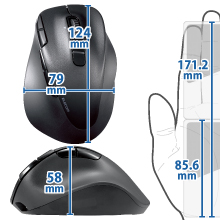
XLサイズ

中指の先端から手のひらの下までの長さが180~195mmの方にピッタリとフィットします。

握らないマウスEX-G(右手)
握らないマウスEX-G(右手)
握らないマウスEX-G(右手)
握らないマウスEX-G Pro(右手)
Customer Reviews
3.9 out of 5 stars 502
3.8 out of 5 stars 672
4.0 out of 5 stars 666
4.0 out of 5 stars 459
Price ¥2,857 ¥3,734 ¥4,088 ¥6,088
接続方式 有線 無線2.4GHz Bluetooh 無線2.4GHz + Bluetooh
ボタン数 5ボタン 5ボタン 5ボタン 8ボタン
サイズ S / M / L / XL S / M / L / XL S / M / L / XL S / M / L / XL
握らないマウスEX-G(左手)
握らないマウスEX-G(左手)
握らないマウスEX-G(左手)
握りの極みマウスEX-G(右手)
握りの極みマウスEX-G(右手)
Customer Reviews
3.9 out of 5 stars 98
3.9 out of 5 stars 143
4.1 out of 5 stars 6,896
4.0 out of 5 stars 2,518
Price ¥3,072 ¥2,618 ¥2,618 ¥1,350 ¥2,110
接続方式 有線 無線2.4GHz Bluetooh 無線2.4GHz Bluetooh
ボタン数 5ボタン 5ボタン 5ボタン 5ボタン 5ボタン
サイズ S / M / L / XL S / M / L / XL S / M / L / XL M M
Brief content visible, double tap to read full content.
Full content visible, double tap to read brief content.

Popular Brand

エレコム(ELECOM)

90% positive ratings from 100K+ customers

100K+ recent orders from this brand


From the brand

Product description

Specifications:
■Connector shape 1: Receiver: USB-A plug.
■Connector shape 2: Charging port: USB Type-C(TM) connector
■ Connection method: USB 2.4 GHz wireless / Bluetooth (R) wireless
■ Bluetooth (R) Standard: Bluetooth 5.0 Class 2
■Supported profiles: HOGP (HID Over GATT Profile)
■Compatible models: Windows OS, macOS, ChromeOS, Android, IOS, and iPad OS equipped with USB port or Bluetooth(R) HOGP
■Supported OS (Windows): Windows 11/10
■Supported OS (Android): Android 12-13
■Supported OS (macOS): macOS Ventura 13
■Supported OS (iOS): iOS 16
■Supported OS (iPadOS): iPad OS 16
■Supported OS (others): ChromeOS
■Communication method: GFSK method
■Radio frequency: 2.4GHz band
■ Radio Transmission Distance: Maximum about 32.8 ft (10 m) *May vary depending on the environment used. May differ depending on the usage environment.
■ Connection switch function: Compatible (USB 2.4 GHz: 1 x / Bluetooth (R): 2 x Bluetooth).
■Reading method: Ultimate Blue
■ Sensor resolution: 1000/2000DPI
■Number of buttons: 8 *Includes wheel buttons
■Number of wheels: 1
■Receiver storage: Yes
■ Power Supply: Built-in lithium-ion secondary battery (rechargeable)
■Battery life: up to about 1 month *May vary depending on usage conditions.
■Size category: XL size
■ External dimensions: Width 3.2 inches (82 mm) x Depth 5.0 inches (126 mm) x Height 2.4 inches (61
■External Dimensions (Receiver): Width 0.6 inches (15 mm) x Depth 0.8 inches (20 mm) x Height 0.3 inches (7 mm).
■Weight: Approx. 4.7 oz (135 g).
■ Weight (Receiver): Approx. 0.08 oz (2 g).
■ Contents: Mouse body x 1, Receiver x 1, Charging cable (USB-A to USB Type-C (TM)] (Cable length: 0.3m) x 1.
■Color: Black
■Warranty period: 2 years

【Description】
■ EX-G PRO 8-button mouse developed in collaboration with doctors for ultimate grip comfort and functionality in the series.
■ In cooperation with Shishinodai Orthopedic Surgical Chiroin Miyagawa, we focused on the "radial muscles and "total finger extensor" that moves the wrists, and the "total finger extens" to pursue the best angle and shape of the hand muscles that move the mouse.
■ Since you can use it just by placing your hand on naturally, there is no extra force on it, and it is comfortable to use with both your wrist and fingers.
■ In order to achieve a comfortable feeling that you don't have to hold it, we use a shape that has been cut out and does not feel seams. In addition, we aimed to achieve an even more advanced grip with seamless feel that makes it easy to access each button.
■The EX-G series is certified by the "AskDoctors Evaluation Service" which conducts an objective evaluation of the product conducted by M3 Inc. 99% of 100 doctors have said that I would recommend this product."
■*April 2023 AskDoctors research
- The left and right buttons adopt a silent switch developed by Panasonic. No loss of clicking and durability for high quietness.
■ Since it does not hear any annoying click sounds, you can use it without worrying about operating your computer during meetings or working at home at early morning or at night.
■ Antibacterial treatment prevents the growth of bacteria adhered to the surface of the mouse and keeps it clean. (Antibacterial Range: Mouse housing, wheel part)
■ This product has a performance that inhibits or inhibits the growth of bacteria on the surface and complies with antimicrobial tests set by the Japan Standards Association (JSA).
■ The XL size is perfect for those with a length of over 7.7 inches (195 mm) from the tip of the middle finger to the bottom of the palm.
■ The above is for reference only.
■ 8 button type with "Forward" and "Backward" buttons that are convenient for operating web browsers and folders.
■ In addition to "Forward" and "Back" web browser is equipped with 3 function buttons. Aligning frequently used operations will improve computer workability.
■Free downloadable button function assignment software "Elecom Mouse Assistant" allows you to customize the buttons to your desired functions.
■ Depending on the speed of the wheel, the scroll and fast scroll automatically switches between one row and a smart fast scroll that allows you to operate it quickly and accurately.
- Equipped with a tilt wheel that allows you to scroll horizontally with just tilt. You can scroll up and down left and right with just a wheel, which greatly improves your work efficiency when using Excel or web browsers.
■ Uses a highly durable "magnetic wheel" that does not deteriorate parts due to friction.
- Equipped with a "connection destination switching" function that can connect up to 3 devices. Store the connection destination between 2 Bluetooth and 1 wireless 2.4 GHz and you can switch the connection with one button.
■ Equipped with an "Ultimate Blue" optical sensor that further improves the traditional Blue LED. It accurately reflects light and reaches the sensor which is smaller than conventional products, so you can operate it in almost any location with any material or color of the reading surface of the mouse.
■ Tracking capacity may decrease on some materials, such as materials that do not reflect light or are completely transparent. It is not guaranteed to work on all operating surfaces.
■ The button on the top of the mouse allows you to switch the cursor speed of 1000 / 2000 counts.
■ It can memorize the moving speed of the cursor set according to the connection method.
■ Even in office environments that use a multitude of electronics, it adopts a unique design that stabilizes the connection with the mouse and prevents cursor flying.
■ Equipped with a repeatable rechargeable lithium ion battery that can be used for approximately 1 month on a full charge. Equipped with a battery indicator indicator that notifies you when it is charging.
■ Compatible with Bluetooth(R) HOGP computers, you can use the mouse without connecting the receiver, making it perfect for computers and tablets with low USB ports.
■ Even with PCs that are not compatible with Bluetooth(R) HOGP, you can also use a Bluetooth(R) connection by having a Bluetooth adapter that meets the standard. (Recommended Bluetooth adapter: LBT-UAN05C2 series (sold separately)
■ The receiver uses an ultra-small type that can be stored in the main body of the mouse, so it is easy to carry around without losing it.
■ This product meets more than one of our own environmental certification standards and displays the "THINK ECOLOGY" mark.
■ We work hard to reduce waste and make this product paperless with the instruction manual included with the product.
■ This product is a "2 year" warranty that you can use with confidence.

Product inquiries
Elecom General Information Center
TEL. 0570-084-465
FAX. 0570-050-012
Reception Time / 10:00 - 19:00 24/7

Brief content visible, double tap to read full content.
Full content visible, double tap to read brief content.

Product Videos

音声はありません
Video Player is loading.
Loaded: 25.03%
Remaining Time 0:24
エレコムダイレクトショップ【ELECOM直営公式ストア】
Customer Review製品紹介 静音マウスSee Full Review

Customer reviews

4 out of 5 stars
459 global ratings

Review this product

Share your thoughts with other customers
手が大きくなくても、XLの世界を味わって貰いたいです。
5 out of 5 stars
手が大きくなくても、XLの世界を味わって貰いたいです。
比較的手が小さいと言われる私ですが。これは1番大きいサイズのこちらがしっくり来ました。 一日中使っても、そこまで疲れないかなとは思います。ただ、やっぱり手が小さいのに、1番大きいサイズなので、若干指の動きが大変になる時もありますが、そんな時は正直多くないので、OKでした。 ボタンカスタマイズもあって、1発でコピペができたり、チャッピー呼び出せたり、とても便利です。ピアノやってた人ならもっと指が器用に使えるのかもしれませんね♪
Thank you for your feedback
Sorry, there was an error
Sorry we couldn't load the review

Top reviews from Japan

    Translated by Amazon
    See original
  • 5 out of 5 stars
    ミドルクリックが若干気持ち悪い操作感だが、他は問題なし
    Reviewed in Japan on March 25, 2026
    Brief content visible, double tap to read full content.
    Full content visible, double tap to read brief content.

    M-BL21DB XGM20DLS MNK01DBSの3シリーズのエレコム静音マウスを使ってきて、傾斜がついているものしか多ボタンのマウスが売られていないことから仕方なく購入

    バッテリーになったことから軽いとかの違和感はすぐ慣れるので問題ないとして、ミドルクリックの操作感が慣れづらい

    人差し指の腹の中心より指先で押すと、右チルトを誤爆してしまう

    指の腹で捉える分には問題ないが、ホイールの回転数を稼ぐために指先をデフォでホイール操作に多用する人がミドルクリックを指先で押そうとするとストレスになる

    角度がついていると理解して押すにしても慣れが必要

    おまけのファンクションボタンみたいなのは、爆音というほどではないが親指で押す一個のボタン以外は申し訳程度の静音だったりする

    あと記憶違いやYouTube側の問題だったら済まないが、なぜか知らないけどエレコムマウスアシスタント5時代ではできたチルトでのYouTubeの秒数送りができなくなっている

    ソフトウェア的な問題くさいので、アップデートで再実装されるかもしれない

    2 people found this helpful
    Sending feedback...
    Thank you for your feedback.
    Sending feedback...
    Thanks, we'll investigate in the next few days.
    Translated from Japanese by Amazon
    See original
  • 4 out of 5 stars
    使用感とバッテリー充電の弊害
    Reviewed in Japan on May 19, 2026
    Brief content visible, double tap to read full content.
    Full content visible, double tap to read brief content.

    今までロジクールの8ボタンタイプを使っていましたが、あまりにも値段が高くなったことでこちらを購入。手のサイズ表を見てLサイズを購入しましたが、自分にはMサイズがちょうどよかったようです。手首を浮かせて作業するタイプの人は表通りの物、手首をつけて作業するタイプの人はワンサイズ小さいものがいいかと思います。

    使用感はおおむね満足で、親指の位置にもファンクションボタンがあるのが非常に使い勝手がいいです。加えてチルトホイールや他ファンクションボタンもエレコムの『マウスアシスト』と言うアプリでカスタムできる事も評価点高いです。

    費用対効果で考えると非常に高得点ですが、唯一弱点を言うとするならば、充電が切れるのが早い気がします。前回充電時間短かったかな?もう少し使ってみないとわかりませんが、自分は充電式より単三電池交換タイプの方が好きなので、そこだけが唯一マイナス点です。

    4 people found this helpful
    Sending feedback...
    Thank you for your feedback.
    Sending feedback...
    Thanks, we'll investigate in the next few days.
    Translated from Japanese by Amazon
    See original
  • 5 out of 5 stars
    結局こういう「握りやすさ」に特化した形が一番疲れない。
    Reviewed in Japan on January 12, 2026
    Brief content visible, double tap to read full content.
    Full content visible, double tap to read brief content.

    仕事で一日中マウスを握っているので、手首の疲れが限界でこちらに買い替えました。 最初は少し変わった形だなと思いましたが、実際に手を乗せてみると、指の置き場所が自然に決まる感じで収まりがいいです。Lサイズを選びましたが、成人男性の手ならちょうどいいサイズ感だと思います。

    ボタンの押し心地もしっかりしていますが、カチカチ音がしない静音タイプなので、静かなオフィスでも気兼ねなく使えるのがいいですね。個人的には、高速スクロールが便利で助かっています。長いExcelのデータやWebページを見る時のストレスがかなり減りました。

    接続についても、Bluetoothとレシーバーの両方が選べるので、メインのPCとサブのタブレットで使い分けられるのが便利です。一度設定してしまえば切り替えもスムーズでした。

    充電式なのも、電池の買い置きを気にしなくて済むので楽です。これまでは電池式のものを使っていましたが、重さのバランスもこっちの方が安定している気がします。 多機能すぎて使いこなせるか不安でしたが、専用ソフトでボタンに機能を割り当てられるので、自分なりに使いやすいように設定して愛用しています。

    3 people found this helpful
    Sending feedback...
    Thank you for your feedback.
    Sending feedback...
    Thanks, we'll investigate in the next few days.
    Translated from Japanese by Amazon
    See original
  • 3 out of 5 stars
    マウスカーソルの微妙な操作が出来ない。
    Reviewed in Japan on August 16, 2025
    Brief content visible, double tap to read full content.
    Full content visible, double tap to read brief content.

    机とマウスの摩擦が強すぎて、微妙な操作がしずらくそこがストレスを感じる。

    ボタンを押す、リンクを押すときにマウスを微妙に動かすだけが出来ない。

    細かい作業をマウスで行う人にはおすすめ出来ない。

    また、バッテリーの持ちが悪い。

    3 people found this helpful
    Sending feedback...
    Thank you for your feedback.
    Sending feedback...
    Thanks, we'll investigate in the next few days.
    Translated from Japanese by Amazon
    See original
  • 5 out of 5 stars
    手が大きくなくても、XLの世界を味わって貰いたいです。
    Reviewed in Japan on May 3, 2026
    Brief content visible, double tap to read full content.
    Full content visible, double tap to read brief content.

    比較的手が小さいと言われる私ですが。これは1番大きいサイズのこちらがしっくり来ました。

    一日中使っても、そこまで疲れないかなとは思います。ただ、やっぱり手が小さいのに、1番大きいサイズなので、若干指の動きが大変になる時もありますが、そんな時は正直多くないので、OKでした。

    ボタンカスタマイズもあって、1発でコピペができたり、チャッピー呼び出せたり、とても便利です。ピアノやってた人ならもっと指が器用に使えるのかもしれませんね♪

    手が大きくなくても、XLの世界を味わって貰いたいです。
    手が大きくなくても、XLの世界を味わって貰いたいです。
    手が大きくなくても、XLの世界を味わって貰いたいです。
    手が大きくなくても、XLの世界を味わって貰いたいです。

    比較的手が小さいと言われる私ですが。これは1番大きいサイズのこちらがしっくり来ました。

    一日中使っても、そこまで疲れないかなとは思います。ただ、やっぱり手が小さいのに、1番大きいサイズなので、若干指の動きが大変になる時もありますが、そんな時は正直多くないので、OKでした。

    ボタンカスタマイズもあって、1発でコピペができたり、チャッピー呼び出せたり、とても便利です。ピアノやってた人ならもっと指が器用に使えるのかもしれませんね♪

    One person found this helpful
    Sending feedback...
    Thank you for your feedback.
    Sending feedback...
    Thanks, we'll investigate in the next few days.
    Translated from Japanese by Amazon
    See original
  • 4 out of 5 stars
    慣れれば快適になります
    Reviewed in Japan on June 8, 2026
    Brief content visible, double tap to read full content.
    Full content visible, double tap to read brief content.

    電池ではなく、充電式のため、途中使えなくなった場合、有線で充電しながら使う感じになります。はじめは親指が、小さいボタンにあたり違和感を覚えますが、慣れれば快適になります。

    Sending feedback...
    Thank you for your feedback.
    Sending feedback...
    Thanks, we'll investigate in the next few days.
    Translated from Japanese by Amazon
    See original
  • 1 out of 5 stars
    思ったよりデカい
    Reviewed in Japan on April 12, 2026
    Brief content visible, double tap to read full content.
    Full content visible, double tap to read brief content.

    手の大きさ165mmでSサイズ購入。他のSサイズ商品と比較するとはるかにデカい。サイズ設定間違っているのでは?と疑うレベル。手首が浮くのでパットありきの設計なのかもしれない。

    表面サラサラで指紋が付きにくく良い。

    反面、乾燥肌だと滑るし大きいしでクリックするたびずっぽ抜けて握り直しとなる。

    性能はプロ仕様なのに残念です。

    2 people found this helpful
    Sending feedback...
    Thank you for your feedback.
    Sending feedback...
    Thanks, we'll investigate in the next few days.
    Translated from Japanese by Amazon
    See original
  • 2 out of 5 stars
    チルトホイールはいまいち(1セルずつの移動となる)。高速ホイールも引っ掛かりが強くて微妙。
    Reviewed in Japan on May 18, 2026
    Brief content visible, double tap to read full content.
    Full content visible, double tap to read brief content.

    ロジ社の2軸マウスが壊れて、新しく買い直す際に本商品を購入。

    縦方向高速ホイール:いまいち。ひっかかりが強いし、奥側(画面上部移動)の場合は、同シリーズの通常ホイールマぐらいしか回らない。手前側(画面下部移動)もロジの回転を知ってしまうと、動きが悪い。

    横移動のチルトホイール:Excel、スプレッドシートで1アクション、1セルの移動のよう。倒し続けることで、1セル以上の横移動も可能だが、カクカク移動して、気持ちが良くない。ロジクールの2軸マウスのような動きはできなかった。残念。

    One person found this helpful
    Sending feedback...
    Thank you for your feedback.
    Sending feedback...
    Thanks, we'll investigate in the next few days.
    Translated from Japanese by Amazon
    See original

Top reviews from other countries

  • 5 out of 5 stars
    So comfortable
    Reviewed in the United States on November 11, 2024
    Brief content visible, double tap to read full content.
    Full content visible, double tap to read brief content.

    Nice materials. It tracks cleanly and works great right out of the box. What sets this mouse apart from other ethos is the buttons and body cradle you hand in comfort. This mouse is an absolute joy to use and makes my desk look nice. Buy it if you’re looking for ergo and functionality. Oh yea the materials they use don’t pick up finger oils. Game changer! 5 stars thanks Elecom

    So comfortable
    So comfortable
    5 out of 5 stars
    So comfortable
    Reviewed in the United States on November 11, 2024

    Nice materials. It tracks cleanly and works great right out of the box. What sets this mouse apart from other ethos is the buttons and body cradle you hand in comfort. This mouse is an absolute joy to use and makes my desk look nice. Buy it if you’re looking for ergo and functionality. Oh yea the materials they use don’t pick up finger oils. Game changer! 5 stars thanks Elecom

    Sending feedback...
    Thanks, we'll investigate in the next few days.
  • 4 out of 5 stars
    Large Mouse, Slow buttons
    Reviewed in the United States on May 20, 2024
    Brief content visible, double tap to read full content.
    Full content visible, double tap to read brief content.

    Great mouse, especially for large hands. I purchased the XL size, great fit. But the buttons/clicks are not as crisp as the Logitech MX Master 3. Good mouse over all, just be patient when you click on something.

    Sending feedback...
    Thanks, we'll investigate in the next few days.
  • 5 out of 5 stars
    Very good for large hands. Wheel is a bit cheap and mouse accuracy isn't the best. Battery is good.
    Reviewed in the United States on November 13, 2024
    Brief content visible, double tap to read full content.
    Full content visible, double tap to read brief content.

    Overall I am happy with this mouse. It's not too large or weirdly oriented like full sized ergonomic mice, but it's large enough where my hand doesn't cramp after hours of use.

    The battery charge holds well enough. My mouse stays on 24-7. I use my mouse on and off, for about 12-16 hours a day. The battery lasts about a week between charges, which takes about 1 hour.

    The mouse wheel does feel like it was an afterthought, but it's good if you need an accurate line-by-line scroll. The mouse DPI is really low, so it takes time getting used to if you're used to high DPI mice.

    Sending feedback...
    Thanks, we'll investigate in the next few days.
  • 3 out of 5 stars
    Would be perfect with some improvements
    Reviewed in the United States on December 20, 2023
    Brief content visible, double tap to read full content.
    Full content visible, double tap to read brief content.

    I have very small hands for an adult woman, and the size small in this mouse is both comfortable, AND actually allows me to reach all the buttons - something that could not be said for my Logi Lift mouse, which is also supposedly made for smaller hands.

    I've been through carpal and cubital tunnel release surgeries, but still need to be careful with regard to ergonomics. This is the only vertical mouse (albeit it's a semi-vertical mouse) with tilt scroll wheel functionality, something I very much missed when using my Logitech Lift mouse.

    The other thing I love about this mouse, is that it has the most buttons of any mouse I've been able to find in a small size. The typical mouse "suitable for small hands" has a normal scroll wheel, and at most two thumb buttons, often and infuriatingly placed in a spot that can't be reached with small hands. This issue is especially true for small gaming mice. This Elecom mouse has the two extra functions provided by the tilt scroll wheel, three thumb buttons, and two extra buttons to the left of the main left mouse button. Unfortunately, the DPI button beneath the scroll wheel is NOT programmable.

    The Mouse Assistant software installs in Japanese and needs to be swapped to English. The default profile name was still in Japanese, but it was easy enough to choose "Edit Profile" and "rename" to change it to English. You ARE able to create profiles to pair with executables, which I appreciate as a gamer.

    I saw a review that claimed you couldn't program the mouse to use keyboard characters. This was a bug at one point, but currently isn't true. Thanks to some awkward translations, you need to choose "arbitrary key" and that allows you to pick whichever one, two or three keyboard characters you want. I just needed to be able to pick a single character for each button, so this is plenty for me.

    As for things I do NOT like about this mouse, there isn't any on-board profile memory. Close the Mouse Assistant software, and you're back to default mouse settings. If you swap to another PC, and install the Elecom software, it reads nothing from the mouse, and you have to reprogram everything from scratch. Make changes, and you need to make them across every PC or Mac. There is also no exporting a profile to import elsewhere. This is a hugely disappointing decision made by Elecom.

    Another disappointing choice was for the USB cable. It is a proprietary USB-C to USB-A cable as per Elecom, yet it's completely unlabeled and generic looking, making it MUCH too easy to lose. Worse, it's also only about a foot long, and it's effectively made even shorter thanks to all the kinks introduced into it at the factory when they folded and bound it. Presumably the length was selected with some combination of cheapness and laptop users in mind - except it's on the short side even for laptop users that use the built-in keyboard. Meanwhile, both laptop users with external keyboards and desktop computer users, *absolutely* can't type and charge with just that cable. You can technically use an extension cable with it, however, the Elecom manual warns against potential fire hazards if using anything other than THEIR cable, thanks to the relative volatility of lithium-ion batteries.

    Another flaw is that you can only see battery status in Bluetooth mode. I'm using this mouse with the USB dongle, since that's better for gaming, but had to waste one of only two available Bluetooth modes on this same PC, JUST so I can check to see where my battery levels are at. They could have had a battery level indication in the Mouse Assistant software for wireless dongle mode, or had it display in Windows settings, Bluetooth & Devices, which it does for the mouse in Bluetooth mode, but it was completely forgotten. Since it still shows the Bluetooth status/battery levels even in 2.4 GHz mode, I'm likely eating more battery life using this workaround.

    Battery levels matter beyond not wanting to be stuck with a dead mouse at an inconvenient time. The non-removable lithium-ion battery will potentially render this mouse a paperweight in a couple of years, and that's assuming the lithium-ion battery doesn't turn all "spicy pillow" and become a literal fire hazard. Best practices (not letting the battery completely run out, and not re-charging to max levels) are impossible to manage if you don't know what the battery level IS.

    Elecom would have stood out if they'd chosen to go with replaceable batteries, instead. My old Logitech G700 mice were rechargeable (albeit I couldn't reach all the buttons), and used AA Eneloop rechargeable batteries that could be charged in place, or physically swapped out. Batteries lose capacity? Buy some new Eneloops, and recycle the old. THAT is the way to do it.

    Unfortunately, even Logitech went for built-in batteries in future wireless models, since it sells more mice in the long run, at the expense of needless environmental waste, and consumer dollars. I would actually have preferred a wired version of this mouse to one with a non-replaceable lithium-ion battery, but the wired Elecom mice are unfortunately all bare bone models lacking the necessary functionality of this model.

    This could have been a five-star mouse, but poor decisions, such as its dependence on software instead of onboard memory, the inability to export/import profiles, its proprietary/too-short/too generic-looking-not-to-lose charging cable, and its non-replaceable battery, compounded by its lack of battery status display, are the reason this mouse is overall a 3 instead of the 5 I wanted to give it.

    I'll be keeping this mouse, because there's literally nothing else in this category that fits my hands so well. Thankfully, most of the cons are only of intermittent or eventual concern or annoyance, but I hope Elecom is more thoughtful in a future iteration of this mouse, or at least they decide to offer a USB wired version.

    Edit: I’ve been disappointed to experience issues with the tilt scroll wheel. It doesn’t always react, which is particularly frustating given (1) it’s one of the reasons I chose this mouse and (2) I keybind it for healing potions or spells in various video games. Left scroll wheel clicks that don’t actually DO anything get my characters killed. Immensely frustrating.

    Sending feedback...
    Thanks, we'll investigate in the next few days.
  • 1 out of 5 stars
    Great mouse ruined by bad decisions
    Reviewed in the United States on September 9, 2024
    Brief content visible, double tap to read full content.
    Full content visible, double tap to read brief content.

    Mouse itself is 9/10. Easily the best ergonomic mouse I've ever used, fits my hand well. The buttons are gratifyingly tactile and the scroll wheel has just the right amount of heft. The sensor is also incredibly accurate and honestly pretty decent for gaming.

    HOWEVER, it is utterly unforgivable to use proprietary charging cables in 2024. The entire point of USB is to be a Universal standard. It's literally in the name. The fact this mouse can only charge with the included 6-inch cable, combined with its mediocre-at-best battery life, is an unfortunate achilles' heel on an otherwise solid product.

    Sending feedback...
    Thanks, we'll investigate in the next few days.

Product Summary: Elecom Wireless Mouse, Silent EX-G PRO XL Size, Bluetooth, Wireless 2.4GHz, Dual Compatibility, Rechargeable, 8 Buttons, High-Speed Scroll, Tilt Wheel, Antibacterial, Black M-XGXL50MBSKBK

From エレコム(ELECOM)

4.0 out of 5 stars, 459 ratings

Customer reviews

100+ bought in past month

Price

No featured offers available

Other sellers

Other sellers

About this Item

  • The ultimate grip comfort developed in collaboration with doctors and the highest functionality in the series realized in an 8-button mouse "EX-G PRO"
  • Under the cooperation of Dr. Ichiro Miyakawa, Director of Kashiwadai Orthopedic and Internal Medicine, we focused on the "brachioradialis" muscle that moves the wrist and the "extensor digitorum" muscle that moves the fingers, and investigated the most suitable angle and shape for the hand muscles that move the mouse
  • You can use it simply by placing your hand on it naturally, so it does not require any extra force, and it can be used to minimize the burden on both your wrists and fingers
  • Adopting a shape with rounded corners and no noticeable seams to achieve a sensation as if you are not holding anything In addition, we aimed for an even more evolved grip feeling with easy access to each button and a seamless operation feel
  • The "EX-G" series is a certified product of the "AskDoctors Evaluation Service" implemented by M3, Inc., where numerous doctors provide objective evaluations of the product 99% of 100 doctors evaluated that they want to recommend this product ※Survey conducted by AskDoctors in April 2023

Product description

Specifications: ■Connector shape 1: Receiver: USB-A plug. ■Connector shape 2: Charging port: USB Type-C(TM) connector ■ Connection method: USB 2.4 GHz wireless / Bluetooth (R) wireless ■ Bluetooth (R) Standard: Bluetooth 5.0 Class 2 ■Supported profiles: HOGP (HID Over GATT Profile) ■Compatible models: Windows OS, macOS, ChromeOS, Android, IOS, and iPad OS equipped with USB port or Bluetooth(R) HOGP ■Supported OS (Windows): Windows 11/10 ■Supported OS (Android): Android 12-13 ■Supported OS (macOS): macOS Ventura 13 ■Supported OS (iOS): iOS 16 ■Supported OS (iPadOS): iPad OS 16 ■Supported OS (others): ChromeOS ■Communication method: GFSK method ■Radio frequency: 2.4GHz band ■ Radio Transmission Distance: Maximum about 32.8 ft (10 m) *May vary depending on the environment used. May differ depending on the usage environment. ■ Connection switch function: Compatible (USB 2.4 GHz: 1 x / Bluetooth (R): 2 x Bluetooth). ■Reading method: Ultimate Blue ■ Sensor resolution: 1000/2000DPI ■Number of buttons: 8 *Includes wheel buttons ■Number of wheels: 1 ■Receiver storage: Yes ■ Power Supply: Built-in lithium-ion secondary battery (rechargeable) ■Battery life: up to about 1 month *May vary depending on usage conditions. ■Size category: XL size ■ External dimensions: Width 3.2 inches (82 mm) x Depth 5.0 inches (126 mm) x Height 2.4 inches (61 ■External Dimensions (Receiver): Width 0.6 inches (15 mm) x Depth 0.8 inches (20 mm) x Height 0.3 inches (7 mm). ■Weight: Approx. 4.7 oz (135 g). ■ Weight (Receiver): Approx. 0.08 oz (2 g). ■ Contents: Mouse body x 1, Receiver x 1, Charging cable (USB-A to USB Type-C (TM)] (Cable length: 0.3m) x 1. ■Color: Black ■Warranty period: 2 years 【Description】 ■ EX-G PRO 8-button mouse developed in collaboration with doctors for ultimate grip comfort and functionality in the series. ■ In cooperation with Shishinodai Orthopedic Surgical Chiroin Miyagawa, we focused on the "radial muscles and "total finger extensor" that moves the wrists, and the "total finger extens" to pursue the best angle and shape of the hand muscles that move the mouse. ■ Since you can use it just by placing your hand on naturally, there is no extra force on it, and it is comfortable to use with both your wrist and fingers. ■ In order to achieve a comfortable feeling that you don't have to hold it, we use a shape that has been cut out and does not feel seams. In addition, we aimed to achieve an even more advanced grip with seamless feel that makes it easy to access each button. ■The EX-G series is certified by the "AskDoctors Evaluation Service" which conducts an objective evaluation of the product conducted by M3 Inc. 99% of 100 doctors have said that I would recommend this product." ■*April 2023 AskDoctors research - The left and right buttons adopt a silent switch developed by Panasonic. No loss of clicking and durability for high quietness. ■ Since it does not hear any annoying click sounds, you can use it without worrying about operating your computer during meetings or working at home at early morning or at night. ■ Antibacterial treatment prevents the growth of bacteria adhered to the surface of the mouse and keeps it clean. (Antibacterial Range: Mouse housing, wheel part) ■ This product has a performance that inhibits or inhibits the growth of bacteria on the surface and complies with antimicrobial tests set by the Japan Standards Association (JSA). ■ The XL size is perfect for those with a length of over 7.7 inches (195 mm) from the tip of the middle finger to the bottom of the palm. ■ The above is for reference only. ■ 8 button type with "Forward" and "Backward" buttons that are convenient for operating web browsers and folders. ■ In addition to "Forward" and "Back" web browser is equipped with 3 function buttons. Aligning frequently used operations will improve computer workability. ■Free downloadable button function assignment software "Elecom Mouse Assistant" allows you to customize the buttons to your desired functions. ■ Depending on the speed of the wheel, the scroll and fast scroll automatically switches between one row and a smart fast scroll that allows you to operate it quickly and accurately. - Equipped with a tilt wheel that allows you to scroll horizontally with just tilt. You can scroll up and down left and right with just a wheel, which greatly improves your work efficiency when using Excel or web browsers. ■ Uses a highly durable "magnetic wheel" that does not deteriorate parts due to friction. - Equipped with a "connection destination switching" function that can connect up to 3 devices. Store the connection destination between 2 Bluetooth and 1 wireless 2.4 GHz and you can switch the connection with one button. ■ Equipped with an "Ultimate Blue" optical sensor that further improves the traditional Blue LED. It accurately reflects light and reaches the sensor which is smaller than conventional products, so you can operate it in almost any location with any material or color of the reading surface of the mouse. ■ Tracking capacity may decrease on some materials, such as materials that do not reflect light or are completely transparent. It is not guaranteed to work on all operating surfaces. ■ The button on the top of the mouse allows you to switch the cursor speed of 1000 / 2000 counts. ■ It can memorize the moving speed of the cursor set according to the connection method. ■ Even in office environments that use a multitude of electronics, it adopts a unique design that stabilizes the connection with the mouse and prevents cursor flying. ■ Equipped with a repeatable rechargeable lithium ion battery that can be used for approximately 1 month on a full charge. Equipped with a battery indicator indicator that notifies you when it is charging. ■ Compatible with Bluetooth(R) HOGP computers, you can use the mouse without connecting the receiver, making it perfect for computers and tablets with low USB ports. ■ Even with PCs that are not compatible with Bluetooth(R) HOGP, you can also use a Bluetooth(R) connection by having a Bluetooth adapter that meets the standard. (Recommended Bluetooth adapter: LBT-UAN05C2 series (sold separately) ■ The receiver uses an ultra-small type that can be stored in the main body of the mouse, so it is easy to carry around without losing it. ■ This product meets more than one of our own environmental certification standards and displays the "THINK ECOLOGY" mark. ■ We work hard to reduce waste and make this product paperless with the instruction manual included with the product. ■ This product is a "2 year" warranty that you can use with confidence. Product inquiries Elecom General Information Center TEL. 0570-084-465 FAX. 0570-050-012 Reception Time / 10:00 - 19:00 24/7

Options Available

Size

  • L size
  • Size M
  • S size
  • XLサイズ

Pattern Name

  • mouse pad set
  • Wrist Rest Set
  • Single Item
Browse all available options

Feedback

Did you find this product summary feature useful?

Thank you for your feedback
Thank you for your feedback. You selected "Yes, it is useful"
Thank you for your feedback. You selected "No, it is not useful"
Product summary presents key information. Close to see all product details.