China-Linked TA4922 Hackers Target UK, Europe With New SilentRunLoader Malware

China-Linked TA4922 Hackers Target UK, Europe With New SilentRunLoader Malware

Proofpoint says TA4922, a suspected China aligned cybercrime group, is targeting UK and European organisations with tax, payroll and benefits themed malware campaigns.

A suspected China-aligned cybercrime group tracked as TA4922, previously known for targeting organisations in East Asia, is now running campaigns against organisations in the UK, Germany, Italy, and South Africa.

Proofpoint researchers said the group has increased its attacks in recent months, using familiar phishing tactics with a growing set of malware tools. The activity includes credential theft, fraud attempts, remote access malware, and the use of legitimate remote management software to help maintain access inside victim networks.

Targeting UK Organisations

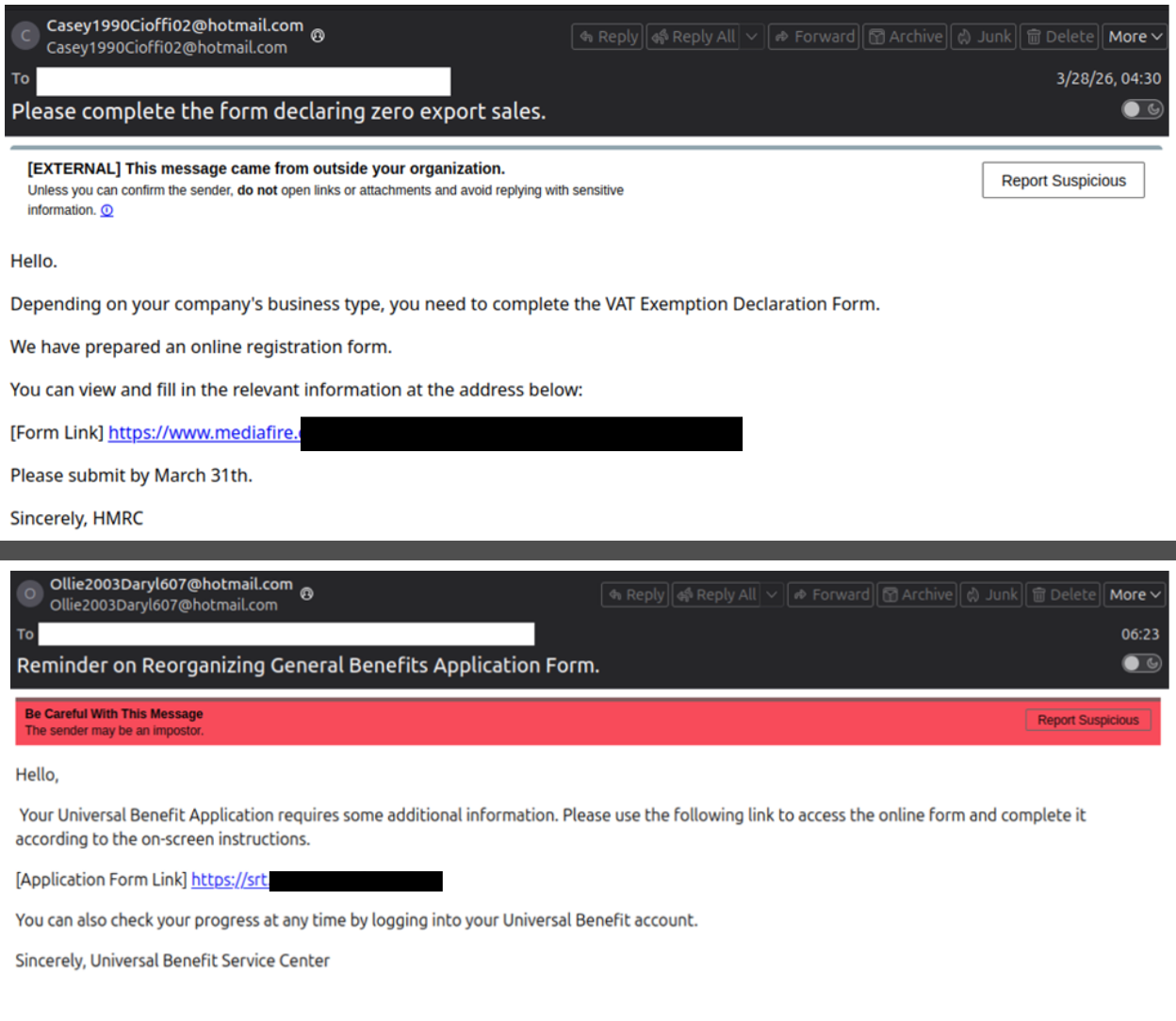
For UK organisations, the most relevant activity involves emails designed to look like routine government or business communications. One campaign impersonated tax authorities and referenced VAT filings, payroll tax documents, and regulatory compliance. Another used benefits and compliance-themed messages that copied the language of government and universal benefits services.

Those lures, according to researchers, were not generic spam as they were written around local business processes that employees already deal with, such as tax paperwork, HR notices, salary files, invoices, and compliance requests. That approach gives attackers a better chance of getting a recipient to open a file, click a link, or move the conversation to another channel.

Proofpoint said TA4922 has historically targeted Japan and other parts of Asia, including Taiwan, Korea, Singapore, and India. The newer activity suggests the group is testing a wider victim pool, with European and African organisations now appearing in its campaigns.
Proofpoint Tracks TA4922 as China Aligned Cybercrime Group Targets UK Organisations
A tax-themed phishing email impersonates HMRC, and a benefits-themed phishing email uses a shortened link to send recipients to download malware. (Image credit: Proofpoint)

Updated Malware Kit

The group’s malware toolkit has also grown. Proofpoint reported the use of variants of ValleyRAT, also known as Winos4.0, Atlas RAT, RomulusLoader, and SilentRunLoader. Each tool plays a different role, from gaining remote access to loading further payloads or stealing browser data.

SilentRunLoader, a newer Python-based stealer and loader, was likely developed with help from large language models (LLMs). It is one of the more notable additions to TA4922’s toolkit because it targets data stored in Google Chrome. Proofpoint said the malware can collect stored credentials, cookies, and browsing information before sending the data to attacker-controlled infrastructure.

In the UK tax-themed campaign, the malware was hosted through MediaFire and delivered through links embedded in emails.

TA4922 has also used DLL sideloading, a technique where a malicious file is loaded by a legitimate executable. For a victim, the file may appear to be part of a normal document package or business application. In practice, it can start malware while making the activity harder to spot during routine scans.

Another part of the group’s modus operandi is the use of legitimate remote management tools such as AnyDesk and SyncFuture. These products have valid business uses, but attackers can abuse them after gaining access, giving them a way to control systems while their activity appears less obviously malicious.

Proofpoint also assessed with high confidence that some of TA4922’s newer Python malware was likely developed with help from large language models. Researchers pointed to code comments, strings, and unchanged placeholder values as signs that the actor may be using AI tools to produce malware faster.
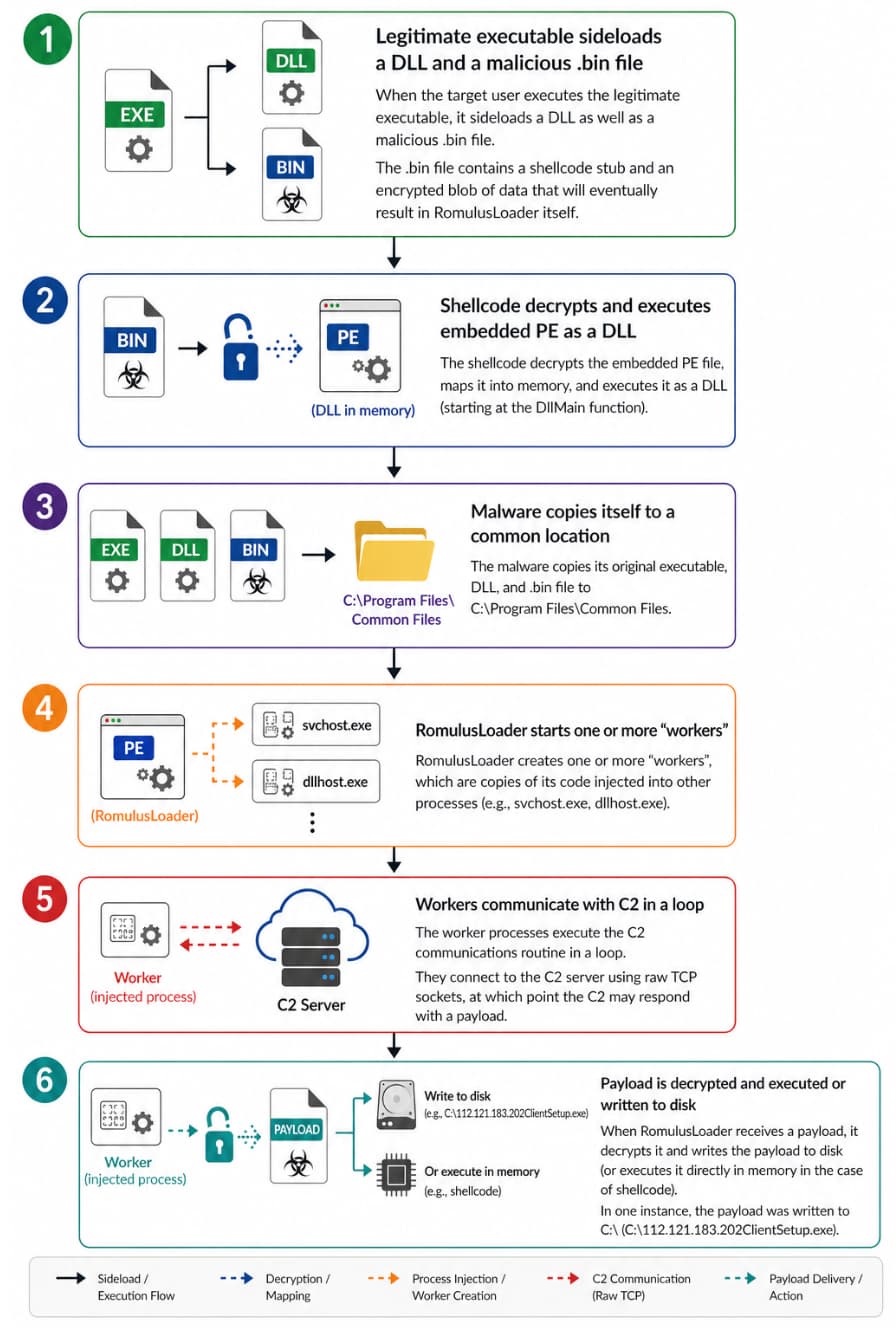
Proofpoint Tracks TA4922 as China Aligned Cybercrime Group Targets UK Organisations
The diagram shows how RomulusLoader works in this campaign (Image credit: Proofpoint)

Financially Motivated Attacks

Proofpoint’s report, shared with Hackread.com, states that the actor appears financially motivated, with activity aimed at remote access, data theft, fraud, access resale, or persistent access. Some of TA4922’s tools have similarities with those used in espionage cases, but Proofpoint is treating the group as a separate cybercrime operation.

The research also adds TA4922 to the growing list of financially motivated groups using a mix of malware, phishing, trusted services, and AI-assisted development. The group’s move into the UK and other regions shows that campaigns once concentrated in East Asia are now becoming a direct concern for more international organisations.

Nevertheless, organisations must beware of administrative-themed cyber attacks where tax filings, payroll documents, benefits notices, and compliance requests may sound ordinary at first but make them a useful cover for attackers. That’s why employee cybersecurity training is a must.

I am a UK-based cybersecurity journalist with a passion for covering the latest happenings in cybersecurity and tech world. I am also into gaming, reading and investigative journalism.
Leave a Reply

Your email address will not be published. Required fields are marked *

Related Posts
How to Recover Data from iCloud Backup Without Resetting Your iPhone

How to Recover Data from iCloud Backup Without Resetting Your iPhone

Restore data from an iCloud backup without the necessity of resetting your iPhone. Discover proven methods to get back your photos, messages, contacts, and many more things in a very easy way.

There are lots of ways you can lose your important data on the iPhone. For example, accidentally deleting files, an unsuccessful iOS update, the device is damaged, or you just bought a new phone. Apart from Apple providing restoration from backup by iCloud, one must erase the iPhone and perform a factory reset to be able to restore the backup.

Fortunately, retrieving data from an iCloud backup without having to erase your current files and settings is not something out of the question. Using modern recovery techniques and software, people nowadays can choose which data they want to recover, such as photos, messages, contacts, etc., without compromising their other content at all.

This article will guide you through the process to recover data from an iCloud backup without resetting your iPhone.

Understanding How iCloud Backup Recovery Works

What Data Is Stored in an iCloud Backup?

One purpose of an iCloud backup is to store a variety of important information from your iPhone so that you can get back your data in case you need it. Generally, this will be your camera roll photos and videos, messages and iMessage attachments, contacts, call history, notes, reminders, app data, and device settings. Some backups may also include data from third-party apps like WhatsApp and Viber if the apps are set to store data in the backup.

Why Apple’s Default Method Requires a Reset

Apple’s official method of restoration from an iCloud backup first requires people to erase all content and settings on their iPhone. So, all old data, applications, and settings of the phone will be deleted before the backup is restored.

This method can even delete any new stuff saved since the backup was made, and it might be quite slow as users must set up the phone again, download apps, and enter passwords.

Is It Possible to Recover Data Without Resetting?

Yes. Rather than doing a complete restoration, people these days are opting for partial recovery techniques. These methods will show you what you have so you can decide to recover only, e.g., pictures, texts, and phone book, while you can keep the rest of your iPhone data untouched.

Recovery programs made by third parties simplify and secure the whole operation, which is a major concern for people who have iOS versions up to date. Also, these applications are great as they can perform an iCloud backup scan directly and pick what to extract, which means no needless data loss.

Best Way to Recover Data from iCloud Backup Without Resetting

One of the best ways to retrieve data from an iCloud backup without your iPhone being reset to factory settings is to perform a selective recovery rather than using Apple’s full restoration method.

For example, Wondershare Dr.Fone – Data Recovery (iOS) is software that helps you integrate your iCloud account, check the backups, and identify the files that can be restored. You can recover multiple types of data (photos, SMS, contacts, etc.) without deleting the data present on your iPhone or resetting the phone to factory settings.

Key features:

  • Granting access to iCloud backups while skipping factory reset
  • Provision of recovery preview so that only necessary files get restored
  • Selective recovery capability of photos, messages, contacts, WhatsApp, etc.
  • Compatible with recent iOS versions and devices
  • Operates by reading-only to scan to keep data safe and unchanged
  • Ability to recover from iCloud, iTunes, and device storage in a single application

Step-by-Step Guide to Recover Data from iCloud Backup Without Resetting

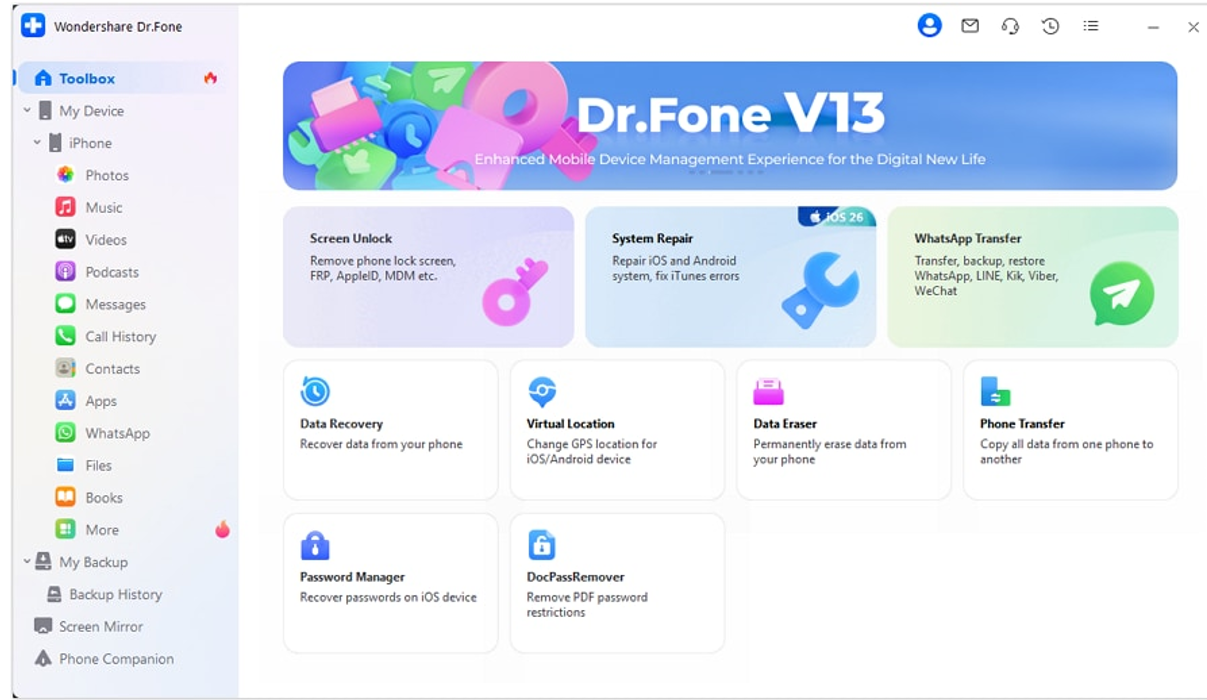
Step 1. Launch Wondershare Dr.Fone on your PC. Click on the Toolbox in the left panel and then select Data Recovery.

How to Recover Data from iCloud Backup Without Resetting Your iPhone

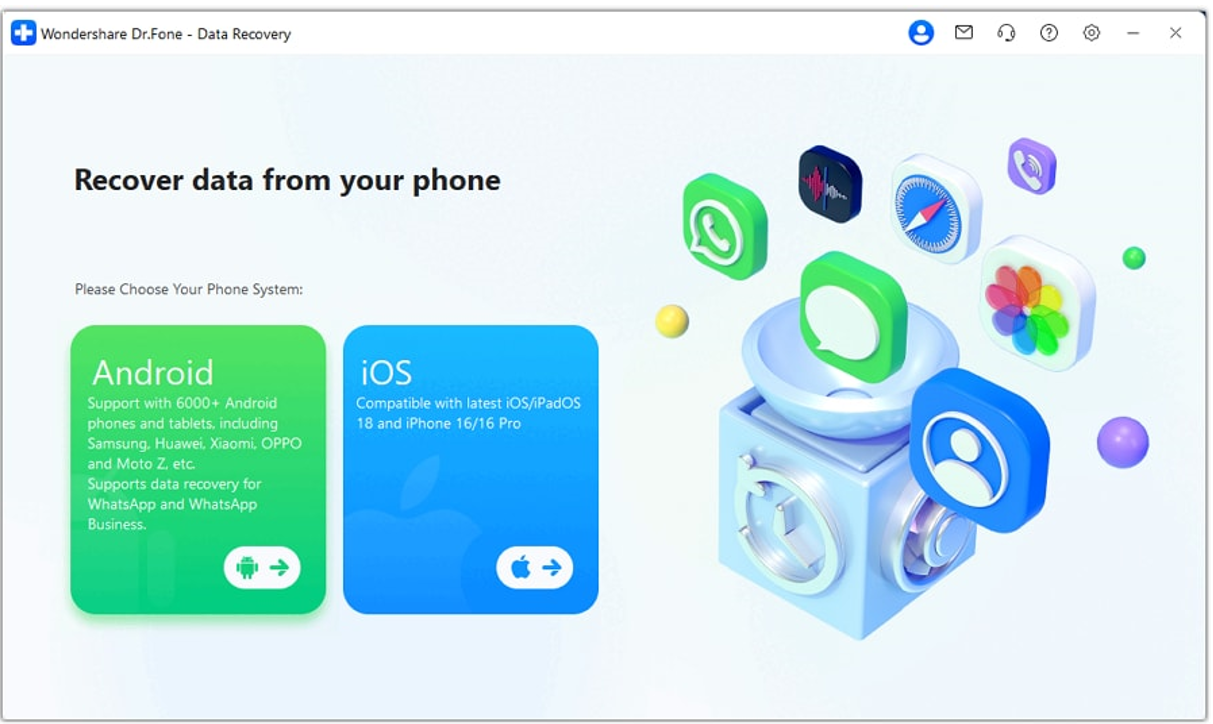
Step 2. Here, you must choose iOS Data Recovery. It will make sure that you are following the right recovery route for iPhone/iCloud data.

How to Recover Data from iCloud Backup Without Resetting Your iPhone

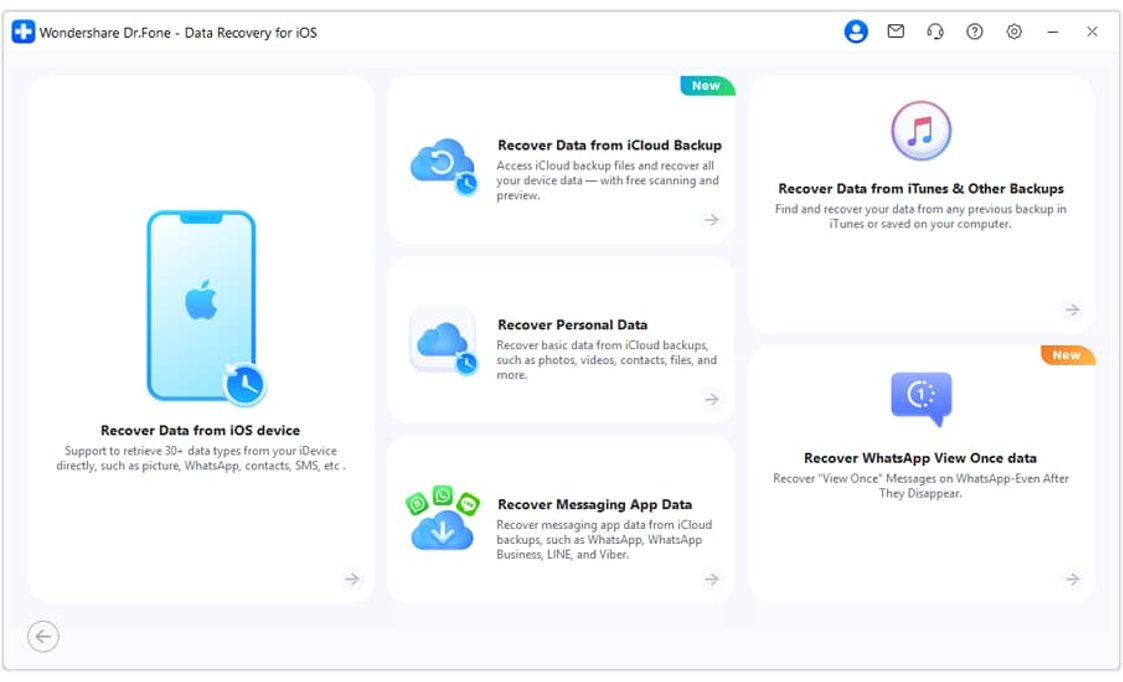
Step 3. Now pick up Recover Data from iCloud Backup. With this option, you will be able to access iCloud backups without having to restore them to your iPhone.

How to Recover Data from iCloud Backup Without Resetting Your iPhone

Step 4. Use your Apple ID and password to sign in.

Step 5. When you have successfully signed in, be patient as the Wondershare Dr.Fone loads all the iCloud backups available under your account. When they are displayed, click on the backup that you want and then press Download.

Step 6. Once the download is completed, Wondershare Dr.Fone presents the backup file contents.

Step 7. Pick the files you want to recover. Click the Recover to Computer button to save them without having to reset your iPhone.

Types of Data You Can Recover from iCloud Backup

Benefits of Data Recovery without iPhone Reset

  • Recovery does not affect your existing photos, apps, and settings at all.
  • You don’t have to wipe the iPhone, download apps again, and adjust settings after that.
  • Restore just the items you want, such as pictures, text messages, or contacts, rather than the entire backup.
  • A perfect solution for those who use their iPhones regularly and don’t wish to be too interrupted.

Tips to Prevent Future Data Loss

  • Be prepared to recover your data using reliable recovery software if you accidentally delete files or your device breaks down.
  • Enable iCloud Backup so your phone will back up automatically on a daily basis, thereby saving your latest data safely in the cloud.
  • Have both iCloud and computer backups using Finder or iTunes to be sure the problem will not fail one backup.
  • Make a habit of backing up important photos, videos, and work files to either external or cloud storage so you are not caught without any data in case of a problem.

Conclusion

Restoring data from an iCloud backup without erasing your iPhone is a convenient and safer way to recover valuable files while keeping your current data intact. Instead of performing a full device reset, selective recovery allows you to preview and restore only the items you need, such as photos, messages, contacts, and app data.

This makes the recovery process easier and more transparent by letting you access your iCloud backups, review recoverable files, and restore selected items without resetting your device.

Leave a Reply

Your email address will not be published. Required fields are marked *