Charge coins immediately
If you have a COMIC TORANOANA or Fantia account, you can log in with either account. TORA COINCOMIC TORANOANA・Fantia It is a rechargeable web money that can be used when purchasing products, with 1 JPY= 1 coin.
Announcement from TORA COIN SHOP
FAQ
It may take about 10 minutes for the payment to be reflected on the TORA COIN SHOP site from PayPay .
If your payment is not reflected after 10 minutes or more, please contact us using the inquiry form and provide the email address of the account you used to make the payment or COMIC TORANOANA membership ID information, along with your PayPay payment number.
[How to check your payment number]
1. Open the PayPay app.
2. Press [Balance].
3. Your payment history will be displayed under [Balance History]. Select the appropriate payment for TORA COIN.
4. Click [View Details].
5. Check the [Payment Number]. You can copy the number by clicking the square mark to the right of the payment number.
It may take approximately 15 minutes for the transaction to be reflected on the TORA COIN SHOP website via au PAY .
If it is not reflected after 15 minutes or more, please provide the email address of the account you used for payment or COMIC TORANOANA member ID information.
Please include your au PAY transaction number when contacting us via the inquiry form .
[How to check the slip number]
1. Open the au PAY app.
2. Click on [Transaction History].
3. Tap the "TORA COIN SHOP" order you would like to inquire about.
4. Please check the [Invoice Number].
It may take about 15 minutes for the transaction to be reflected on the TORA COIN SHOP site from メルペイ .
If your payment is not reflected after 15 minutes, please enter the email address of the account you used to make the payment or COMIC TORANOANA membership ID information.
Please contact us using the inquiry form , including メルペイ transaction number.
[How to check your transaction number]
1. Open the Mercari app.
2. Click [Payment] at the bottom of the in-app screen.
3. Click on the transaction listed under [Recent Transactions].
4. Check the [Transaction Number].
The email address of the account you used for payment or COMIC TORANOANA membership ID information,
Please contact us using the inquiry form , including the "payment date and time" and "payment amount" of FamiPay.
[How to check the payment date and time and payment amount]
1. Open the FamiPay app.
2. Click [My Page] at the bottom right of the home screen.
3. Click [FamiPay(Balance/Bonus)] in [History].
4. Click "Details" for the payment to the relevant TORA COIN.
5. Check the "payment date and time" and "payment amount."
When using TORA COIN 'COMIC TORANOANA site, if you are unable to make a payment due to insufficient balance or other reasons, you will be switched to a second payment method.
TORA COIN that have already been deducted will be refunded as coins with the "original expiration date" when you switch to the second payment method, so if a refund is actually made, it is assumed that it will fall under the above.
*Please note that TORA COIN cannot be made.
For information on how to use TORA COIN on online shopping sites, please also check the help page below.
https://help.toranoana.jp/faq/7834/
Generally, your payment will be reflected within two business days of receiving it.
If the payment is not reflected after 2 business days, please contact us via the inquiry form , providing the order ID and payment amount, which can be confirmed on the Unpaid Orders screen.
Due to the bank closures from December 31, 2024 to January 6, 2025, customers who make bank transfers after Friday, December 27, 2024 will be able to make transfers from January 6, 2025, when the bank reopens.
If the name of the sender is incorrect, we will check separately and contact you if we are unable to charge the card.
If you have not received your payment within a week, please contact us via the Inquiry form and include the order ID and payment amount, which can be viewed on the Unpaid Orders screen.
As a general rule, we do not accept cancellations or refunds after application and payment have been made.
If there are any issues with your payment, we will contact you.
If you request a refund at that time, the refund amount will be minus a flat refund fee of 1,100 JPY(tax included) .
If there is a discrepancy in the transfer amount, please contact us .
Please contact us with your order ID and payment amount, which can be confirmed on the unpaid orders screen.
You can link your "mail order ID," "Fantia ID," and "Creatia ID."
After logging in, you can link your account from " Available Services " in the "Account Menu".
If you use Fantia with an online shopping account, you will need to link your accounts to reflect the coins you purchased.
■How to link your accounts —————————————————–
1. Log in to Fantia and change your password from the account settings screen. Account settings screen (https://fantia.jp/mypage/account/edit)
*If you have already done this, you can skip this step.
*This operation will not change the password for your online shopping account.
2. Log in to the TORA COIN website and view the available services screen. Available services screen (https://toracoin.toranoana.jp/cooperation)
3. Click the "Link" button for "Link with Fantia"
4. A pop-up will appear saying "Once linked, you will not be able to unlink or change to another account. Do you want to continue linking?" Check this and click "OK".
5. The login screen for Fantia will be displayed, so enter the email address you registered with Fantia
Log in using the password you set in step 1.
6. Once the connection is complete, you will automatically be returned to the TORA COIN purchase site screen.
7. Please confirm that Fantia is linked on the available services screen of the TORA COIN site.
——————————————————–
Two-factor authentication is a feature that protects TORA COIN account from fraudulent use by verifying your identity via SMS in addition to the normal login process.
Setting up two-factor authentication is optional, so you can still use TORA COIN even if you do not set it up. If you wish to use it, please set it up here .
*Currently, the SMS authentication function only supports Japanese phone numbers.
1. After logging in to your account, open the " Two-Factor Authentication Settings " page
2. Press Settings to enter the Settings page.
3. Enter the mobile phone number you wish to verify in the phone number field, check the privacy policy, and if you agree, check "I agree to our privacy policy," check Google reCAPTCHA, and then click "Next."
4. Enter the 6-digit number sent via SMS to the phone number you entered in step 3 and click "Authenticate."
For your convenience, if it is confirmed that you have logged in most recently in the same environment, you can skip two-factor authentication and log in. Please rest assured that two-factor authentication will be performed if a certain period of time has passed or if you log in in a different environment.
If you can continue to receive SMS messages with the phone number you set up, you can continue to use the service. If you are no longer able to receive SMS messages, please disable two-factor authentication here, then set it up again with a phone number that can receive SMS messages.
If you are not receiving SMS even though you have set up two-factor authentication with a phone number that is still available, the following may be the case.
Please check if any of the above conditions apply to you, and then try two-factor authentication again.
If you are no longer able to receive two-factor authentication SMS, you will not be able to log in to your account. Please contact us using the inquiry form .
TORA COINmail order・It is a rechargeable web money that can be used when purchasing products on Fantia and Creatia , with 1 JPY= 1 coin.
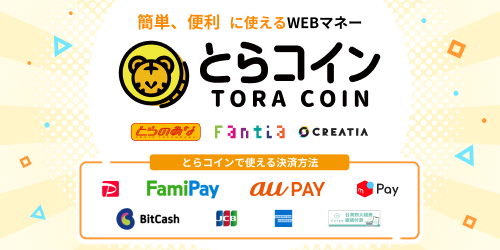
現在JCB、American Express、PayPay、FamiPay、au PAY、メルペイ、銀行振込、BitCash、AFTEE先享後付、仮想通貨がご利用いただけます。
お客様に安心してご利用いただくために、クレジットカード決済では3Dセキュアでの本人確認が必須となります。恐れ入りますが3Dセキュア非対応のクレジットカードはご利用になれません。
*Currently, Visa and Mastercard credit cards cannot be used with TORA COIN.
*Payments via Alipay+ will end at 5:00 PM on Friday, May 24, 2024.
COMIC TORANOANA, Fantia, and Creatia sites without any restrictions on services.
These are campaign coins distributed for each service and can only be used with specific services.
The validity period for common coins is 180 days after purchase. The validity period for limited coins varies depending on the campaign, so please check the announcement page for each campaign.
■When purchasing from COMIC TORANOANA, the product price will be charged when you place your order, and the shipping fee will be charged when you ship your order.
If you do not have enough coins to cover the cost of the item at the time of purchase, you will not be able to complete the order process.
If there is insufficient balance at the time of shipping, we will change your order details to a second payment method (credit card, cash on delivery, or cancellation).
■If purchasing on Fantia, the points will be consumed at the time of payment.
■When purchasing at Creatia, the points will be consumed at the time of payment.
■If you purchase from COMIC TORANOANA(e-book), the points will be consumed at the time of payment.