Notice: Your browser is not supported or outdated so some features of the site might not be available.

Samsung Odyssey G55C S27CG55  Monitor Review

Review updated Apr 23, 2024 at 01:37pm
Retest Aug 11, 2025 at 12:10pm
Tested using Methodology v2.0.1 
Samsung Odyssey G55C S27CG55

Track

Track a Product
Sign up to track a product and get notified when we share new updates.

Track

 8

The Samsung Odyssey G5/G55C S27CG55 is a 27-inch, 1440p budget gaming monitor with a 1000R curve. It's also available in a 32-inch size and is very similar to the Samsung Odyssey G5/G55A S27AG55. It joins several other monitors in the budget gaming category, including the Dell G2724D. The Samsung has FreeSync VRR support and a high 165Hz refresh rate. It doesn't have many added features, like a USB hub, but it does have some of Samsung's gaming features, like Virtual Aim Point and Contrast Enhancer.

Our Verdict

0.0
PC Gaming 

The Samsung G55C is mediocre for PC gaming. It has FreeSync VRR and is G-SYNC compatible, and its 165Hz refresh rate is good enough for most gamers. However, fast-moving objects are blurry, and it has issues with its input lag, so it doesn't feel responsive. It has okay picture quality as it displays deep blacks, but it lacks a local dimming feature and doesn't make highlights pop against the rest of the image, especially in HDR.

Pros
  • Good native contrast.
  • 165Hz refresh rate and VRR support.
Cons
  • Blurry motion with smearing.
  • High input lag at 165Hz and 60Hz.
  • No local dimming.
  • Noticeable VRR flicker with changing frame rates.
0.0
Console Gaming 

The Samsung Odyssey G55C is disappointing for console gaming. The biggest downside is that it can't take full advantage of the PS5 and Xbox Series X|S due to the lack of HDMI 2.1 bandwidth. It also has limited picture quality, so HDR games don't look vivid, but it has a good native contrast ratio. Unfortunately, fast-moving objects are blurry, and while it has low input lag at 120Hz, its input lag increases a lot more at 60Hz, leading to a less responsive feel.

Pros
  • Good native contrast.
  • Low input lag at 120Hz.
Cons
  • Blurry motion with smearing.
  • High input lag at 165Hz and 60Hz.
  • Mediocre HDR color gamut and volume.
  • Can't take full advantage of gaming consoles.
0.0
Office 

The Samsung G55C is okay for office work. It has good text clarity and gets bright enough to overcome glare, so you can see your work clearly in a brighter room. Its 27-inch screen is also large enough to open two windows side by side. However, it has terrible ergonomics, with no height or swivel adjustments, so it's difficult to place in your preferred position. Additionally, it has poor viewing angles, so sharing your work with others is difficult.

Pros
  • Good text clarity.
  • Bright enough to fight glare.
Cons
  • Terrible ergonomics.
  • Poor viewing angles.
0.0
Editing 

The Samsung G55C is decent for content creation. It has good text clarity, and its 27-inch screen is large enough to open two windows side by side. It also has great accuracy before calibration. However, it has poor viewing angles, and its stand doesn't swivel or have a height adjustment, so sharing your work with others is difficult. It also has limited coverage of HDR colors, which is a problem if you need to edit content with these colors.

Pros
  • Good native contrast.
  • Good text clarity.
  • Bright enough to fight glare.
  • Great accuracy before calibration.
Cons
  • Terrible ergonomics.
  • Poor viewing angles.
  • Mediocre HDR color gamut and volume.
  • No dedicated sRGB mode; needs full calibration for best accuracy.
0.0
Brightness 

The Samsung Odyssey G55C has okay brightness. It gets bright enough to fight glare in most well-lit rooms, but it fails to make highlights pop in HDR.

Pros
  • Bright enough to fight glare.
Cons
  • Can't make highlights pop in HDR.
0.0
Response Time 

The Samsung Odyssey G55C has a bad response time at any refresh rate. Motion looks blurry, and there's noticeable smearing with fast-moving objects.

Pros
None
Cons
  • Blurry motion with smearing.
  • Motion is worse with VRR on than with it off.
0.0
HDR Picture 

The Samsung Odyssey G55C has disappointing HDR picture quality. Although it has a good enough native contrast ratio, it lacks a local dimming feature to improve that further and make small highlights pop against dark backgrounds. It also has a limited HDR color volume, so it fails to display bright and dark colors well.

Pros
  • Good native contrast.
Cons
  • No local dimming.
  • Mediocre HDR color gamut and volume.
0.0
SDR Picture 

The Samsung Odyssey G55C has okay SDR picture quality. It displays deep blacks in dark rooms, but there's noticeable backlight bleed along the edges as it has poor black uniformity.

Pros
  • Good native contrast.
Cons
  • Noticeable backlight bleed.
0.0
Color Accuracy 

The Samsung Odyssey G55C has excellent color accuracy. While it doesn't have a dedicated sRGB picture mode, its accuracy before calibration is still great and fine for most people. However, you still need to calibrate it if you need the most accurate colors.

Pros
  • Great accuracy before calibration.
Cons
  • No dedicated sRGB mode; needs full calibration for best accuracy.
  • 0.0
    PC Gaming
  • 0.0
    Console Gaming
  • 0.0
    Office
  • 0.0
    Editing

  • Performance Usages

  • 0.0
    Brightness
  • 0.0
    Response Time
  • 0.0
    HDR Picture
  • 0.0
    SDR Picture
  • 0.0
    Color Accuracy
  • Changelog

    1.  Updated Aug 11, 2025: 

      We changed the Screen Finish from 'Semi-Gloss' to 'Matte' to better reflect how its coating interacts with light. We also clarified the height to the top of the screen on its stand.

    2.  Updated Feb 21, 2025: We've converted this review to Test Bench 2.0.1. This includes a new test result for DisplayPort 2.1 Transmission Bandwidth.
    3.  Updated Aug 05, 2024: Clarified in the Variants section that it's also sold at Costco with a different model code.
    4.  Updated May 10, 2024: Corrected a mistake in Refresh Rate as the max refresh rate with 10-bit signals over DisplayPort is 120Hz.

    Check Price

    27"LS27CG552ENXZA
    SEE PRICE
    Amazon.co.jp

    Differences Between Sizes And Variants

    We tested the 27-inch Samsung G55C, which is also sold at Costco with a different full product code. This model is also available in a 32-inch size, although it's a different product, so we don't expect it to perform the same, and our results aren't valid for it.

    Model Size Model Code Resolution Panel Type Refresh Rate
    G5/G55C 27" LS27CG552EMXUE
    LS27CG554ENXZA (Costco)
    1440p VA 165Hz
    G5/G55C 32" LS32CG552EMXUE 1440p VA 165Hz

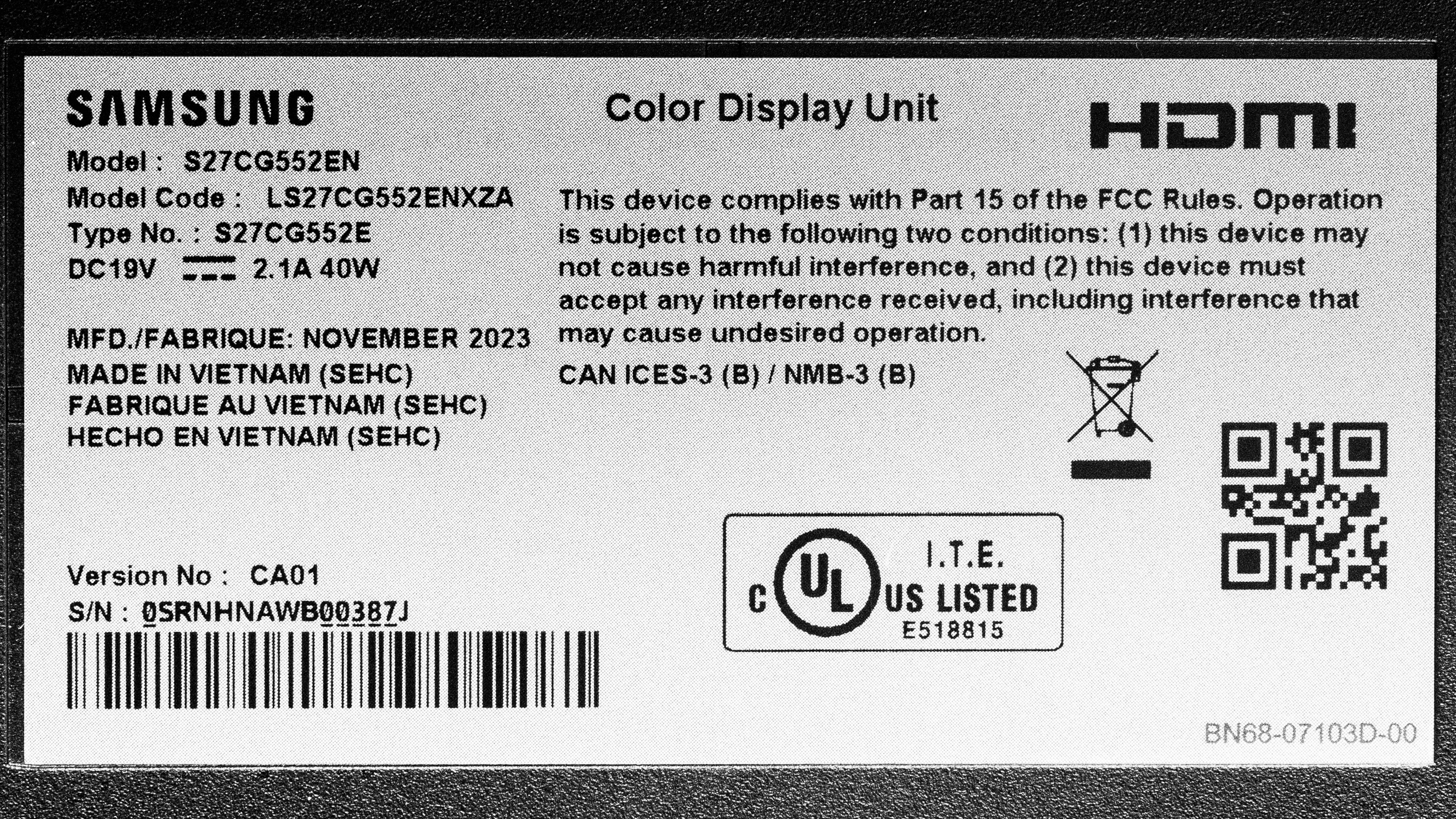
    Our unit was manufactured in November 2023; you can see the label here. We tested it with firmware M-C5500GGZA-1001.0.

    Popular Monitor Comparisons

    The Samsung G55C is a mediocre budget gaming monitor that doesn't match the performance of its competitors in most situations. While it has good contrast and brightness, other monitors in this category have substantially better overall performance. If you're looking for a monitor that performs better overall, take a look at the Dell G2724D. It's better for all uses, particularly gaming. While it has the same refresh rate as the Samsung, the Dell has far better motion handling, so fast-moving objects look crisp, and it has much lower input lag for a more responsive feel.

    For more options, check out our recommendations for the best budget and cheap monitors, the best 1440p gaming monitors, and the best 27-inch gaming monitors.

    LG 32GN600-B

    Track

    The LG 32GN600-B and the Samsung Odyssey G55C S27CG55 are entry-level 1440p gaming monitors with many similarities. Choosing one over the other really comes down to size as the LG has a bigger screen, but because of the smaller screen of the Samsung, it has higher pixel density for sharper text clarity.

    Dell G2724D

    Track

    The Dell G2724D and the Samsung Odyssey G55C S27CG55 are 27-inch gaming monitors. However, the Dell is the better monitor for most people. The Samsung has better contrast, and you may prefer it if you're gaming in a darker room. However, the Dell has better overall performance. The Dell gets considerably brighter and has better reflection handling, making it the better choice for brighter rooms. The Dell also has a far better response time, so fast-moving objects look crisp, and it has lower input lag for a more responsive feel. Additionally, the Dell has far better ergonomics, so it's easier to place in your preferred position for a long gaming session.

    Dell S3222DGM

    Track

    The Samsung Odyssey G55C S27CG55 and the Dell S3222DGM are entry-level 1440p gaming monitors with a few differences, including the screen size. While they each have a curved screen, the curve on the Samsung is more aggressive, which isn't ideal if you aren't used to using a curved screen. The Dell also has a more ergonomic stand, making placing it in an ideal position easier. On the other hand, the Samsung is the better choice for HDR gaming, as the Dell doesn't support HDR at all.

    AOC 24G15N

    Track

    The Samsung Odyssey G55C S27CG55 and the AOC 24G15N are both low-cost gaming monitors. The Samsung is the better choice for most people, as it gets much brighter and has a more detailed display. However, both monitors have similar motion handling, so if you want to spend as little as possible, the AOC could work well if you don't need the Samsung's extra brightness or sharpness.

    Show more 
    How We Test Monitors
    How We Test Monitors

    We buy and test more than 30 monitors each year, all of which we purchase ourselves, without cherry-picked units or samples. We put a lot into each unbiased, straight-to-the-point review, and there's a whole process from purchasing to publishing, involving multiple teams and people. We do more than just use the monitor for a week; we use specialized, custom tools to measure various aspects and deliver objective, data-driven results. We also consider multiple factors before making any recommendations, including the monitor's cost, its performance compared to the competition, and whether it's easy to find.

    Test Results

    perceptual testing image
    Sort:
    RATINGS
    Category:
    All
    Design
    Style
    Curved
    LockedLocked
    Curve Radius
    LockedLocked

    Become a member to view the full test results and text of the reviews, as well as extra website features and tools with no ads.

    0.0
    Build Quality

    Become a member to view the full test results and text of the reviews, as well as extra website features and tools with no ads.

    0.0
    Ergonomics
    Min Height To Top Of Panel
    LockedLock" (Lock cm)
    Height Adjustment
    LockedLock" (Lock cm)
    Tilt Range
    LockedLocked
    Rotate Portrait/Landscape
    LockedLocked
    Swivel Range
    LockedLocked
    Wall Mount
    LockedLocked

    Become a member to view the full test results and text of the reviews, as well as extra website features and tools with no ads.

    Stand
    Base Width
    LockedLock" (Lock cm)
    Base Depth
    LockedLock" (Lock cm)
    Thickness (With Display)
    LockedLock" (Lock cm)
    Weight (With Display)
    LockedLock lbs (Lock kg)

    Become a member to view the full test results and text of the reviews, as well as extra website features and tools with no ads.

    Display
    Size
    Locked27"
    Housing Width
    LockedLock" (Lock cm)
    Housing Height
    LockedLock" (Lock cm)
    Thickness (Without Stand)
    LockedLock" (Lock cm)
    Weight (Without Stand)
    LockedLock lbs (Lock kg)
    Borders Size (Bezels)
    LockedLock" (Lock cm)
    Controls

    Become a member to view the full test results and text of the reviews, as well as extra website features and tools with no ads.

    In The Box
    Power Supply
    LockedLocked

    Become a member to view the full test results and text of the reviews, as well as extra website features and tools with no ads.

    Picture Quality
    0.0
    Contrast
    Native Contrast
    LockedLock : 1
    Contrast With Local Dimming
    LockedN/A

    Become a member to view the full test results and text of the reviews, as well as extra website features and tools with no ads.

    0.0
    Local Dimming
    SAMPLE
    JOIN NOW

    for videos & test results

    Samsung Odyssey G55C S27CG55 Local Dimming Video Sample
    Local Dimming
    LockedLocked
    Backlight
    LockedLocked

    Become a member to view the full test results and text of the reviews, as well as extra website features and tools with no ads.

    0.0
    SDR Brightness
    Real Scene
    LockedLock cd/m²
    Peak 2% Window
    LockedLock cd/m²
    Peak 10% Window
    LockedLock cd/m²
    Peak 25% Window
    LockedLock cd/m²
    Peak 50% Window
    LockedLock cd/m²
    Peak 100% Window
    LockedLock cd/m²
    Sustained 2% Window
    LockedLock cd/m²
    Sustained 10% Window
    LockedLock cd/m²
    Sustained 25% Window
    LockedLock cd/m²
    Sustained 50% Window
    LockedLock cd/m²
    Sustained 100% Window
    LockedLock cd/m²
    Automatic Brightness Limiting (ABL)
    LockedLock
    Minimum Brightness
    LockedLock cd/m²

    Become a member to view the full test results and text of the reviews, as well as extra website features and tools with no ads.

    0.0
    HDR Brightness
    VESA DisplayHDR Certification
    LockedLocked
    Real Scene
    LockedLock cd/m²
    Peak 2% Window
    LockedLock cd/m²
    Peak 10% Window
    LockedLock cd/m²
    Peak 25% Window
    LockedLock cd/m²
    Peak 50% Window
    LockedLock cd/m²
    Peak 100% Window
    LockedLock cd/m²
    Sustained 2% Window
    LockedLock cd/m²
    Sustained 10% Window
    LockedLock cd/m²
    Sustained 25% Window
    LockedLock cd/m²
    Sustained 50% Window
    LockedLock cd/m²
    Sustained 100% Window
    LockedLock cd/m²
    Automatic Brightness Limiting (ABL)
    LockedLock

    Become a member to view the full test results and text of the reviews, as well as extra website features and tools with no ads.

    0.0
    Horizontal Viewing Angle
    SAMPLE
    JOIN NOW

    for videos & test results

    Samsung Odyssey G55C S27CG55 Horizontal Viewing Angle Video Sample
    Color Washout From Left
    LockedLock°
    Color Washout From Right
    LockedLock°
    Color Shift From Left
    LockedLock°
    Color Shift From Right
    LockedLock°
    Brightness Loss From Left
    LockedLock°
    Brightness Loss From Right
    LockedLock°
    Black Level Raise From Left
    LockedLock°
    Black Level Raise From Right
    LockedLock°
    Gamma Shift From Left
    LockedLock°
    Gamma Shift From Right
    LockedLock°

    Become a member to view the full test results and text of the reviews, as well as extra website features and tools with no ads.

    0.0
    Vertical Viewing Angle
    SAMPLE
    JOIN NOW

    for videos & test results

    Samsung Odyssey G55C S27CG55 Vertical Viewing Angle Video Sample
    Color Washout From Below
    LockedLock°
    Color Washout From Above
    LockedLock°
    Color Shift From Below
    LockedLock°
    Color Shift From Above
    LockedLock°
    Brightness Loss From Below
    LockedLock°
    Brightness Loss From Above
    LockedLock°
    Black Level Raise From Below
    LockedLock°
    Black Level Raise From Above
    LockedLock°
    Gamma Shift From Below
    LockedLock°
    Gamma Shift From Above
    LockedLock°

    Become a member to view the full test results and text of the reviews, as well as extra website features and tools with no ads.

    0.0
    Gray Uniformity
    50% Std. Dev.
    LockedLock%
    50% DSE
    LockedLock%

    Become a member to view the full test results and text of the reviews, as well as extra website features and tools with no ads.

    0.0
    Black Uniformity
    Native Std. Dev.
    LockedLock%
    Std. Dev. w/ L.D.
    LockedN/A

    Become a member to view the full test results and text of the reviews, as well as extra website features and tools with no ads.

    0.0
    Color Accuracy (Pre-Calibration)
    Picture Mode
    LockedLocked
    sRGB Gamut Area xy
    LockedLock%
    White Balance dE (Avg.)
    LockedLock
    Color Temperature (Avg.)
    LockedLock K
    Gamma (Avg.)
    LockedLock
    Color dE (Avg.)
    LockedLock
    Contrast Setting
    LockedLock
    RGB Settings
    LockedLocked
    Gamma Setting
    LockedLocked
    Brightness Setting
    LockedLock
    Measured Brightness
    LockedLock cd/m²
    Brightness Locked
    LockedLocked

    Become a member to view the full test results and text of the reviews, as well as extra website features and tools with no ads.

    0.0
    Color Accuracy (Post-Calibration)
    Picture Mode
    LockedLocked
    sRGB Gamut Area xy
    LockedLock%
    White Balance dE (Avg.)
    LockedLock
    Color Temperature (Avg.)
    LockedLock K
    Gamma (Avg.)
    LockedLock
    Color dE (Avg.)
    LockedLock
    Contrast Setting
    LockedLock
    RGB Settings
    LockedLocked
    Gamma Setting
    LockedLocked
    Brightness Setting
    LockedLock
    Measured Brightness
    LockedLock cd/m²
    ICC Profile
    Download

    Become a member to view the full test results and text of the reviews, as well as extra website features and tools with no ads.

    0.0
    SDR Color Gamut
    sRGB Coverage xy
    LockedLock%
    sRGB Picture Mode
    LockedLocked
    Adobe RGB Coverage xy
    LockedLock%
    Adobe RGB Picture Mode
    LockedLocked

    Become a member to view the full test results and text of the reviews, as well as extra website features and tools with no ads.

    0.0
    HDR Color Gamut
    Wide Color Gamut
    LockedLocked
    DCI-P3 Coverage xy
    LockedLock%
    DCI-P3 Picture Mode
    LockedLocked
    Rec. 2020 Coverage xy
    LockedLock%
    Rec. 2020 Picture Mode
    LockedLocked

    Become a member to view the full test results and text of the reviews, as well as extra website features and tools with no ads.

    0.0
    HDR Color Volume
    1,000 cd/m² DCI-P3 Coverage ICtCp
    LockedLock%
    DCI-P3 Picture Mode
    LockedLocked
    10,000 cd/m² Rec. 2020 Coverage ICtCp
    LockedLock%
    Rec. 2020 Picture Mode
    LockedLocked

    Become a member to view the full test results and text of the reviews, as well as extra website features and tools with no ads.

    0.0
    Text Clarity
    Pixel Type
    LockedVA
    Subpixel Layout
    LockedLocked

    Become a member to view the full test results and text of the reviews, as well as extra website features and tools with no ads.

    0.0
    Reflections
    Screen Finish
    LockedLocked
    Total Reflections
    LockedLock%
    Indirect Reflections
    LockedLock%
    Calculated Direct Reflections
    LockedLock%

    Become a member to view the full test results and text of the reviews, as well as extra website features and tools with no ads.

    0.0
    Gradient
    Color Depth
    LockedLock Bit

    Become a member to view the full test results and text of the reviews, as well as extra website features and tools with no ads.

    Motion
    0.0
    Refresh Rate
    Native Refresh Rate
    LockedLock Hz
    Max Refresh Rate
    Locked165 Hz
    Max Refresh Rate Over DP
    LockedLock Hz
    Max Refresh Rate Over HDMI
    LockedLock Hz
    Max Refresh Rate Over DP @ 10-bit
    LockedLock Hz
    Max Refresh Rate Over HDMI @ 10-Bit
    LockedLock Hz

    Become a member to view the full test results and text of the reviews, as well as extra website features and tools with no ads.

    Variable Refresh Rate (VRR)
    Variable Refresh Rate
    LockedLocked
    FreeSync
    LockedLocked
    G-SYNC
    LockedLocked
    VRR Maximum
    LockedLock Hz
    VRR Minimum
    LockedLocked
    VRR Supported Connectors
    LockedLocked

    Become a member to view the full test results and text of the reviews, as well as extra website features and tools with no ads.

    0.0
    VRR Motion Performance
    Recommended VRR OD Setting
    LockedLocked
    Variable Overdrive Advertised
    LockedLocked
    Avg. CAD
    LockedLock
    Best CAD
    LockedLock
    Worst CAD
    LockedLock

    Become a member to view the full test results and text of the reviews, as well as extra website features and tools with no ads.

    0.0
    Refresh Rate Compliance
    Compliance @ Max Hz
    LockedLock%
    Compliance @ 120 FPS
    LockedLock%
    Compliance @ 60 FPS
    LockedLock%

    Become a member to view the full test results and text of the reviews, as well as extra website features and tools with no ads.

    0.0
    CAD @ Max Refresh Rate
    OD Transition Max Refresh Rate
    Join nowfor multiple image controls
    Recommended Overdrive Setting
    LockedLocked
    Avg. CAD
    LockedLock
    Best 10% CAD
    LockedLock
    Worst 10% CAD
    LockedLock

    Become a member to view the full test results and text of the reviews, as well as extra website features and tools with no ads.

    Response Time @ Max Refresh Rate
    Recommended Overdrive Setting
    LockedLocked
    First Response Time
    LockedLock ms
    Total Response Time
    LockedLock ms
    RGB Overshoot
    LockedLock RGB
    Worst 10% First Response Time
    LockedLock ms
    Worst 10% Total Response Time
    LockedLock ms
    Worst 10% RGB Overshoot
    LockedLock RGB

    Become a member to view the full test results and text of the reviews, as well as extra website features and tools with no ads.

    0.0
    CAD @ 120Hz
    OD Transition 120Hz
    Join nowfor multiple image controls
    Recommended Overdrive Setting
    LockedLocked
    Avg. CAD
    LockedLock
    Best 10% CAD
    LockedLock
    Worst 10% CAD
    LockedLock

    Become a member to view the full test results and text of the reviews, as well as extra website features and tools with no ads.

    Response Time @ 120Hz
    Recommended Overdrive Setting
    LockedLocked
    First Response Time
    LockedLock ms
    Total Response Time
    LockedLock ms
    RGB Overshoot
    LockedLock RGB
    Worst 10% First Response Time
    LockedLock ms
    Worst 10% Total Response Time
    LockedLock ms
    Worst 10% RGB Overshoot
    LockedLock RGB

    Become a member to view the full test results and text of the reviews, as well as extra website features and tools with no ads.

    0.0
    CAD @ 60Hz
    OD Transition 60Hz
    Join nowfor multiple image controls
    Recommended Overdrive Setting
    LockedLocked
    Avg. CAD
    LockedLock
    Best 10% CAD
    LockedLock
    Worst 10% CAD
    LockedLock

    Become a member to view the full test results and text of the reviews, as well as extra website features and tools with no ads.

    Response Time @ 60Hz
    Recommended Overdrive Setting
    LockedLocked
    First Response Time
    LockedLock ms
    Total Response Time
    LockedLock ms
    RGB Overshoot
    LockedLock RGB
    Worst 10% First Response Time
    LockedLock ms
    Worst 10% Total Response Time
    LockedLock ms
    Worst 10% RGB Overshoot
    LockedLock RGB

    Become a member to view the full test results and text of the reviews, as well as extra website features and tools with no ads.

    Backlight Strobing (BFI)
    Backlight Strobing (BFI)
    LockedLocked
    Maximum Frequency
    LockedLock Hz
    Minimum Frequency
    LockedLock Hz
    Longest Pulse Width Brightness
    LockedLock cd/m²
    Shortest Pulse Width Brightness
    LockedLock cd/m²
    Pulse Width Control
    LockedLocked
    Pulse Phase Control
    LockedLocked
    Pulse Amplitude Control
    LockedLocked
    VRR At The Same Time
    LockedLocked

    Become a member to view the full test results and text of the reviews, as well as extra website features and tools with no ads.

    0.0
    VRR Flicker
    SAMPLE
    JOIN NOW

    for videos & test results

    Samsung Odyssey G55C S27CG55 VRR Flicker Video Sample
    Dark Gray Flicker
    LockedLock RGB
    Middle Gray Flicker
    LockedLock RGB
    Light Gray Flicker
    LockedLock RGB

    Become a member to view the full test results and text of the reviews, as well as extra website features and tools with no ads.

    0.0
    Image Flicker
    Flicker-Free
    LockedLocked
    PWM Dimming Frequency
    LockedLocked

    Become a member to view the full test results and text of the reviews, as well as extra website features and tools with no ads.

    Inputs
    0.0
    Input Lag
    Native Resolution @ Max Hz
    LockedLock ms
    Native Resolution @ 120Hz
    LockedLock ms
    Native Resolution @ 60Hz
    LockedLock ms
    Backlight Strobing (BFI)
    LockedLock ms

    Become a member to view the full test results and text of the reviews, as well as extra website features and tools with no ads.

    0.0
    Resolution
    Native Resolution
    Locked2560 x 1440
    Aspect Ratio
    LockedLocked
    Megapixels
    LockedLock MP
    Pixel Density
    LockedLock PPI
    0.0
    PS5 Compatibility
    4k @ 120Hz
    LockedLocked
    4k @ 60Hz
    LockedLocked
    1440p @ 120Hz
    LockedLocked
    1440p @ 60Hz
    LockedLocked
    1080p @ 120Hz
    LockedLocked
    1080p @ 60Hz
    LockedLocked

    Become a member to view the full test results and text of the reviews, as well as extra website features and tools with no ads.

    0.0
    Xbox Series X|S Compatibility
    4k @ 120Hz
    LockedLocked
    4k @ 60Hz
    LockedLocked
    1440p @ 120Hz
    LockedLocked
    1440p @ 60Hz
    LockedLocked
    1080p @ 120Hz
    LockedLocked
    1080p @ 60Hz
    LockedLocked

    Become a member to view the full test results and text of the reviews, as well as extra website features and tools with no ads.

    Inputs Photos
    Video And Audio Ports
    DisplayPort
    LockedLocked
    DisplayPort Transmission Bandwidth
    LockedLocked
    Mini DisplayPort
    LockedLocked
    HDMI
    LockedLocked
    HDMI 2.1 Bandwidth
    LockedLocked
    DVI
    LockedLocked
    VGA
    LockedLocked
    Daisy Chaining
    LockedLocked
    3.5mm Audio Out
    LockedLocked
    3.5mm Audio In
    LockedLocked
    3.5mm Microphone In
    LockedLocked
    USB
    USB-A Ports
    LockedLocked
    USB-A Rated Speed
    LockedLocked
    USB-B Upstream Port
    LockedLocked
    USB-C Ports
    LockedLocked
    USB-C Upstream
    LockedLocked
    USB-C Rated Speed
    LockedLocked
    USB-C Power Delivery
    LockedLocked
    USB-C DisplayPort Alt Mode
    LockedLocked
    Thunderbolt
    LockedLocked

    Become a member to view the full test results and text of the reviews, as well as extra website features and tools with no ads.

    macOS Compatibility

    Become a member to view the full test results and text of the reviews, as well as extra website features and tools with no ads.

    Features
    Additional Features
    HDR10
    LockedLocked
    Speakers
    LockedLocked
    RGB Illumination
    LockedLocked
    Multiple Input Display
    LockedLocked
    KVM Switch
    LockedLocked

    Become a member to view the full test results and text of the reviews, as well as extra website features and tools with no ads.

    On-Screen Display (OSD)
    Retailers
    Retailers' pricesAmazon.co.jp
    27"  LS27CG552ENXZA
    SEE PRICE

    Recommended Articles

    Best Monitors For Gaming

    Comments

    1. Product

    Samsung Odyssey G55C S27CG55: Main Discussion  

    Track

    Let us know why you want us to review the product here, or encourage others to vote for this product. Comments transferred from merged discussions are also included.

    PreviewBack to editorFormat guide
    Sort by:
    newest first
    1. A related discussion was merged here. All comments were transferred.

    2. 2
      1
      0
      1
      0

      Would love to see an updated review with version 1008! Samsung claims in a private email to have improved lag and reduced smearing. Seeing as this is still a popular monitor option and one of the only like 3 available 27" 1440p monitors with a 1000R curve an update would be fantastic!

    3. 2
      1
      0
      1
      0

      Can you tell me the best calibration for it please

    4. Update: We changed the Screen Finish from ‘Semi-Gloss’ to ‘Matte’ to better reflect how its coating interacts with light. We also clarified the height to the top of the screen on its stand.

      Show More Updates
    5. 2
      1
      0
      1
      0

      Is it possible to have the best image settings and monitor performance? Odissey g55c

    6. 2
      1
      0
      1
      0

      Is it possible to have the best image settings and monitor performance?

    7. Update: Added that the MSI G274QPF-QD has USB connectivity.

      Show More Updates
    8. 2
      1
      0
      1
      0

      I’m curious to see what changes the 2023 model of the Odyssey G5 has, it’s certainly interesting that Samsung keeps re-releasing this monitor every year or two, this is the third iteration of the same exact monitor if I’m not mistaken

    9. Our testers have started testing this product; is there anything specific you’re looking to see? Let us know in this thread.

      Show More Updates
    10. 2
      1
      0
      1
      0

      @94258
      Hope that help clears things up a bit!

      It did, thank you and I thought it is something like this. Most users want the most bang for the buck, which makes sense! These mentioned monitors are extremely expensive (today Feb.2024) and only enthusiasts buy them…for now.

    11. 3
      2
      1
      2
      0

      Why would you purchase this one, when others are more desired (comments) and higher voted? Just genuine curiousity. Is it because this model is cheap and/or because it was a long time in the list?

      There’s a few different things at play in this case! Some of the other models we want to buy are either not released or out of stock (ASUS ROG Swift PG32UCDM, MSI MPG 321URX QD-OLED, MSI MPG 271QRX QD-OLED).

      Another thing worth mentioning is that we have purchased the Odyssey G5 27" models since its release in 2020, and it always does really well with our users. It also helps that it was available for purchase (unlike the three monitors mentioned above) so we went ahead and bought it!

      Hope that help clears things up a bit!

    12. 0
      -1
      -2
      1
      -2

      Why would you purchase this one, when others are more desired (comments) and higher voted? Just genuine curiousity. Is it because this model is cheap and/or because it was a long time in the list?

    13. We’ve purchased the product and are waiting for it to arrive in our lab.