post by sgro on Mar 11

Website

https://addons.mozilla.org/en-US/firefox/addon/geo-spoof/
Short Description

Disclosure: I am the developer :slight_smile:

Your browser leaks your location through multiple channels: the Geolocation API, timezone offsets, `Intl.DateTimeFormat`, and WebRTC. You get almost no control over it. A VPN changes your IP, but these signals still point right back to where you’re sitting.

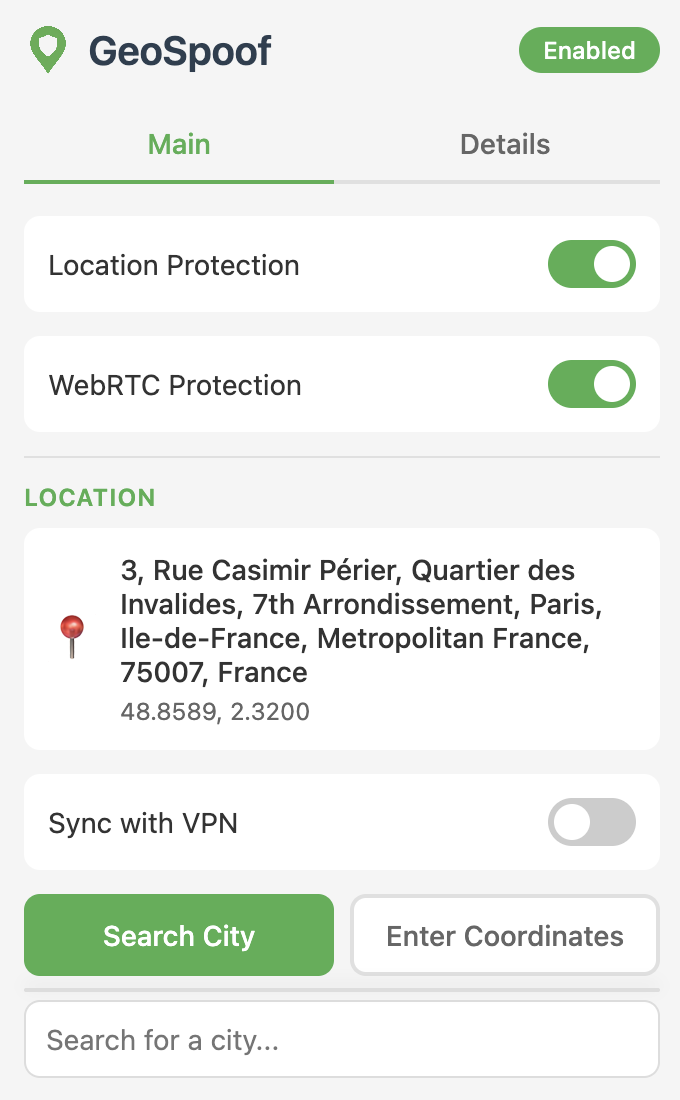
GeoSpoof is a Firefox add-on that spoofs your geolocation, timezone, and WebRTC to prevent websites from identifying your real location. Set your location to match your VPN, mismatch it on purpose for extra obfuscation, or pick somewhere entirely different. GPS coordinates, timezone, `Intl` locale data, and WebRTC all stay in sync with whatever you choose.

I got tired of the other geolocation spoofing extensions because they either 1) didn’t work, 2) didn’t have android support, or 3) were extremely finnicky and hard to use.

Open source: https://www.github.com/anthonysgro/geospoof

Features:

  • Android support
  • Spoof geolocation API with any coordinates
  • VPN Region Sync (auto-detect your VPN exit and match your location to it)
  • Automatic timezone spoofing based on location
  • WebRTC IP leak protection
  • Search locations by city name
  • Manual coordinate entry
  • Toggle protection on/off easily

See full table of overridden browser APIs in the documentation.

And just to make crystal clear, it:

  • does NOT track your browsing activity
  • does NOT collect analytics or telemetry
  • does NOT store data on external servers
  • Some features (city search, VPN sync) make network requests to third-party APIs to function. See the docs for details

Would love to get some feedback from the community. Thanks for reading and have a great evening :slight_smile:

read 15 min

post by parkerchandler1979 on Mar 11

Can you explain if installing and using this will have any impact on browser fingerprint? Or does it not really matter in your view if this is randomizing it all every browsing session/every time you restart your browser? Also clarify if this is going to be randomizing all that it will be spoofing (cause I’d really like that and would be an obvious ask to further the obfuscation efforts).

post by sgro on Mar 11

There is no randomization feature as of now. Today the user can either A) provide explicit latitude and longitude values or B) provide a geographical place via the Nominatim api. The extension then injects a script into your browser that overrides the browser geolocation/timezone/WebRTC apis so websites can only see the value you set.

I think a randomization feature would be pretty neat. I would love to know the things you care about regarding geolocation fingerprinting, how often you would like to randomize locations, maybe an “anywhere BUT x, y…” filter, etc.

post by parkerchandler1979 on Mar 11

I just installed it. I see how it it works now.

I have tested the three options you link to in the extension itself. I am however on Mullvad and while Time Zone and Geolocation is matching the location I chose, WebRTC page is showing my VPN location. Is this how it’s supposed to work or is it meant to provide obfuscation primarily when not on a VPN?

post by parkerchandler1979 on Mar 11

Well, I ask this because if I am visiting a website everyday, the website can still try to infer from my browser fingerprint that it is me (hence my first question above). However, if I select or provide a few options within the extension, then ideally I’d want GeoSpoof to randomize between those selected preferred locations upon every browser reboot/browsing session. Alternatively, it’d be very cool to have it change the location after a set number of hours that we select. For example: location is changed every 4 hours.

These are just ideas I am having for such a tool as it would only further what GeoSpoof is trying to do. No?

post by parkerchandler1979 on Mar 11

More observations: other websites that tell you your geolocation and IP address and whatnot are providing mixed results. Some are showing the one I selected and others are showing my VPN location ( I use Mullvad btw, if that makes any difference).

post by sgro on Mar 11

I have tested the three options you link to in the extension itself. I am however on Mullvad and while Time Zone and Geolocation is matching the location I chose, WebRTC page is showing my VPN location. Is this how it’s supposed to work or is it meant to provide obfuscation primarily when not on a VPN?

Yes, so basically WebRTC is a backdoor that allows websites to see your true IP address even if you are on VPN. WebRTC is allowed to bypass the standard HTTP proxy/VPN settings to ask your operating system for its local and public IP addresses. So consider the example where you live in Los Angeles, set your VPN to Tokyo, and set Geospoof to Berlin:

  1. Without WebRTC Protection: A website can detect your true IP address is in Los Angeles.
  2. With GeoSpoof’s WebRTC Protection: A website will not be able to see your true IP address, they will only see Tokyo.

WebRTC does not impact the geolocation apis in the browser (the ones you set to Berlin).

Moreover the general point is that your IP address is fundamentally different from your browser’s declared Geolocation API (and timezone etc). This extension cannot (and doesn’t claim to) obfuscate your IP address.

If a website deduces your location from your IP address, Geospoof will have no effect. However, if a website deduces your location from your geolocation or timezone browser api, your VPN will have no effect (and you will need Geospoof). My original use case was for users to be able to set their VPN and Geospoof settings to the same location so that they could successfully convince any website of a manually selected location. I hope this clears up any confusion

post by sgro on Mar 11

More observations: other websites that tell you your geolocation and IP address and whatnot are providing mixed results. Some are showing the one I selected and others are showing my VPN location ( I use Mullvad btw, if that makes any difference).

This is most likely because some websites are determining your location via IP address, some are determining your location via the geolocation apis. Sophisticated sites use a combination, date/timezone api, offset, Daylight savings time, etc. The original intention of this extension was to align your Browser geolocation to your VPN IP so that all locations you are emitting are synchronized.

post by parkerchandler1979 on Mar 11

Sorry for the dumb question but then how are you defining spoofing in your tool? I mean, how are you seeing and prefer people see and understand the difference between your tool and what a VPN does? I’m guessing the means through which both try to obfuscate your IP/location is different and that’s how?

Assumption being that IP address and your time zone being different means you’re in the time zone and not really with that VPN IP address. So, I would not say the VPN has no effect but the VPN does not stop the website from inferring this info. Slight difference but an important distiction if you ask me.

Hah! That’s literally what I was thinking too - as to the real use case for such a tool.

post by parkerchandler1979 on Mar 11

Thank you for this clarification. I was confused about this for a minute. I’m still learning about privacy so WebRTC, Secure DNS, VPNs, and other things your tool uses still confuse me as to how they all work and with each other especially.

I always check on Mullvad if I have WebRTC protection. I always do.

post by sgro on Mar 11

how are you defining spoofing in your tool? I mean, how are you seeing and prefer people see and understand the difference between your tool and what a VPN does? I’m guessing the means through which both try to obfuscate your IP/location is different and that’s how?

spoof = user can set browser values to anything they want in accordance with privacy rights and device ownership. Your other questions: this is good feedback because I think I need to make the distinction clearer to people.

Your VPN is not fullproof. You know how you go to a website and it KNOWS you have a VPN on? That is because websites detect inconsistencies in your IP address, WebRTC true IP, browser geolocation apis, timezone, daylight savings time settings, etc. A VPN alone is not enough to fully mask your location.

At the end of the day, if you want to mask your location, you need both:

  1. A VPN to reroute your IP address to a different location
  2. GeoSpoof to reroute your browser’s geolocation and timezone apis to a different location
  3. WebRTC is common in VPNs as a network-level feature, but GeoSpoof ensures that the browser knows WebRTC protection is on.

If you are missing one or the other your location is not truly masked

post by parkerchandler1979 on Mar 11

Thank you for the clarification again. That’s what I was thinking too but it’s good to have confirmation from someone much more knowledgeable on the matter.

Btw, reading your Github and using and testing GeoSpoof, I’m really liking it. It does indeed resolve the issue VPN falls short on. I’ll buy a coffee with that link you have once I get paid later this month.

My main concern going forward using GeoSpoof:

  1. Longevity. Open source products are not always sustainable and last for years one end. Few can make that promise and stick with it. How do you see/respond to such a concern? I’d like this tool to be maintained for years on end without worrying about it becoming deprecated some time in the future. Are you going to be able to ensure of this? I am no developer but I’m guessing it is made simply and doesn’t take too much to keep up with it?

post by parkerchandler1979 on Mar 11

Lastly, I hope you take the suggestion for it auto selecting and randomizing location. It would be even better coupled with a VPN for all your spoofing and obfuscation needs/wants.

Thank you for engaging with me here. I look forward to the community auditing your tool as best as they can for a more final verdict (not that I don’t trust you and your promises being made with it).

post by sgro on Mar 11

Longevity. Open source products are not always sustainable and last for years one end. Few can make that promise and stick with it. How do you see/respond to such a concern? I’d like this tool to be maintained for years on end without worrying about it becoming deprecated some time in the future. Are you going to be able to ensure of this? I am no developer but I’m guessing it is made simply and doesn’t take too much to keep up with it?

This is a classic problem for open source products, you are correct. While I cannot guarantee I won’t get hit by a bus tomorrow (knock on wood), I can say I fully intend on maintaining this project because I use it myself :sweat_smile: At its core, Geospoof is a very lightweight extension and quite maintainable (modern tooling, thorough unit/integration tests, etc) so others can contribute as well.

post by parkerchandler1979 on Mar 11

post by parkerchandler1979 on Mar 11

post by privacy.slouchy on Mar 11

post by sgro on Mar 11

post by any1 on Mar 11

post by sgro on Mar 11

post by sgro on Mar 11

post by any1 on Mar 11

post by parkerchandler1979 on Mar 11

post by sgro on Mar 11

post by sgro on Mar 11

post by parkerchandler1979 on Mar 11

post by parkerchandler1979 on Mar 11

post by Protagonist on Mar 11

post by any1 on Mar 11

post by any1 on Mar 11

post by sgro on Mar 11

post by any1 on Mar 11

post by sgro on Mar 11

post by foxie on Mar 11

post by any1 on Mar 11

post by sgro on Mar 11

post by foxie on Mar 11

post by Protagonist on Mar 12

post by sgro on Mar 12

post by jonah on Mar 12

Load more posts below