

 Check out ArrangerKing, a plugin designed to help you complete your songs!



Since Sweetboy’s website got deleted, I thought it might be a good idea to host his VST plug-ins here. Below you can download 6 packages totaling 18 plug-ins (Windows 32-bit VST only).
SH-1
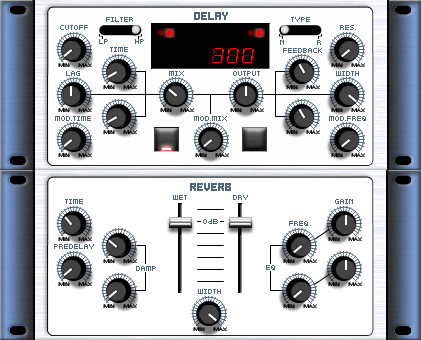
The SH-1 bundle includes 7 VST effect plug-ins.
Now it includes Graphic EQ, Chorus, Filter, Delay, LFO Multi, Reverb and PhaseSifter.
It is a distinction that their weight on cpu is light.
SH-1 bundle features
- SH-1 Graphic EQ
- SH-1 Delay
- SH-1 LFO Multi
- SH-1 Reverb
- SH-1 PhaseShifter
- SH-1 Chorus (Chorus/Flanger)
- SH-1 Filter (Lo-Hi Pass Filter)
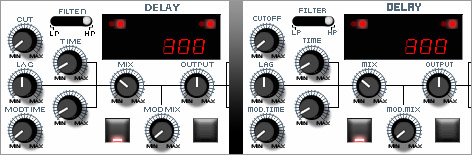
Update 12-11-2006: Grymmjack has fixed the text labels on the SH-1 plug-ins.
SH-1 v1.30 (including fixed skins) — Download size: 799.41 kB
Compare the screenshots below to see the improvements.
Glacier (LinEQ020) linear phase EQ
Glacier (LinEQ020) — Download size: 34.05 kB
RDR dither
RDR v1.01 (zip file) — Download size: 83.68 kB
S and S VSTFX Pack
This pack bundles 6 VST plugins:
- SampleSlider, utility for delay fix (CC 94 delay length).
- StereoStretcher, stereo expander++ included phase inverter. It can convert MONO signal into STEREO signal (CC 10 panpot).
- SFilter, 8-type stereo IIR filter inherited from “SH-1 Filter” (CC 71 resonance, CC 74 cut off frequency).
- SDynamics, stereo compressor/expander/limiter based on “T-SLEDGE”.
- SonicChorus, 2-band multi phase chorus(4-type & 2-type lfo). Because of delay of the plugin(25-sample delay) if you want to use it as “normal” chorus, I recommend to use as “insert effect”.
- SLFO, variable wave form LFO panning tremolo.
S and S VSTFX Pack — Download size: 342.04 kB
T-SLEDGE
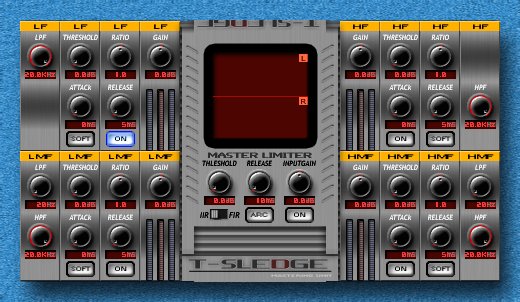
T-SLEDGE is a multi-band compressor for mastering, equipped with peak limiter, level maximizer and 4 compressors/expanders/limiters. And it is equipped with 2 kinds of dividing filter IIR/FIR. So, it also operates as a dynamics EQ.
T-Sledge features
- Threshold: Controls the threshold of compressing/limiting. The signal at a level that is larger than this value is compressed
- Ratio: Controls the ratio of compressing/limiting. It operates as an expander when this value is smaller than 1.0. When this value is maximized, it operates as a limiter
- Attack: Controls the attack time of compressing/limiting
- Release: Controls the release time of compressing/limiting. It makes the sound smooth, if you choose the large value
- Soft: Sets the soft/hard mode of compressing/limiting process. While the soft mode compression gradually compresses the threshold When the hard mode compression reaches the threshold by the signal, it immediately compresses. There a little differences using it, but it makes compressing/limiting process smooth or vivid. At the present stage, this function becomes effective only to the compression processing
- ARC: Sets the automatic release time control system. (Sets all compressor and limiter release time ARC) Automatically ARC calculates the release time. If you want to create loudness sound, I recommend to turn it off
- IIR-FIR: Sets the dividing filter type. If you want to use for mastering, I recommend to use FIR. FIR filter cause a little latency, but it’s no more than 1ms
- Gain: Controls the level of each output signal
- Input Gain: Controls the level of input signal
- Knob: Ctrl+Left-Click -> Fine adjustment of the value. Shift+Left-Click -> Link adjustment of the value. Ctrl+Shift+Left-Click -> Fine link adjustment of the value
- VU Meter: Range 0dB < -> -40dB
T-SLEDGE — Download size: 197.25 kB
Volcano
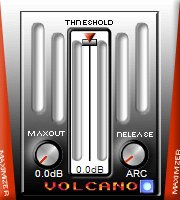
With Volcano, you get an easy to use for mastering or some else. It combines peak limiter and level maximizer. You need not to control many parameters, only 4 parameters there.
Volcano features
- Threshold: Controls the level of limiting. If the sound causes clipping noise, I recommend to change it smaller
- MaxOut: Controls the maximam level of output signal. Leave the MaxOut setting at the maximum value: 0.0 dB
- Release: Controls the release time of limiting. It makes the sound smooth, if you choose large value. If the sound causes clipping noise, I recommend to change it larger
- ARC: Sets the automatic release time control system. Automatically ARC calculates the release time. If you want to create loudness sound, I recommend to turn it off
- Knob: Ctrl+Left-Click -> Fine adjustment of the value
- VU Meter: Range:0dB < -> -30dB
Volcano 1.11 — Download size: 128.40 kB
Check the free plugins page for some more downloads.


Multumim si tot respecrul,asteptam si alte programe,
Cuales son para Mac? ya que no dicen. gracias
Windows only I’m afraid. I’ve changed the text to reflect this.
Thanks
thx muchhhhh yo!!!!!!!!!!!!!!!!!!!!!!!!!!!!!!!!
YO NECESITO EL [ECO DOPPLER] ALGUIEN Q ME AYUDE POR FA MI CORREO ES
herrol@hotmail.es
muchas gracias
Thanks for resharing them here Ronnie :)
got it fixed
i’ve downloaded sum of the filters, placed them in my effects folder and it sais: ”plugin could not be opened, check if it needs to be registered. Why is is sayin this and what can i do to make it work. thnx
i had download this vst’s 2 times n it seems they dot work in my fl studio 9. any help guys .. I’m in the middle of a mix for one of my singles n i need this lil toys, HELP amigos
What is the problem, do they not show or is there an error of some sort? I can use them just fine in FL Studio 10.
Hmmm I’ve placed them in my Audacity plugins folder but they don’t show. I have the latest version too.
I have a few dozen plugins installed, but Audacity only shows a few so it’s being strict about something. The Sweetboy plugins don’t show for me either… sorry!
Great website. Plug-ins were well rounded in terms of effects and flexibility, and the recommendations for each was right on when I began to use them. Thanks for the great site, keep it up
Armando
I HAVE PROFFESIONAL SOUND SYSTEM CAN I USE EFFECT EQUALIZER SOFTWARE WITH PC AT LIVE SHOW? RPLY
Sure, all you need to run Sweetboy plugins is a Windows VST host.
how do i open them? is it bossible with FL Studio9 ?
Yes. Just place the .dll files in your plugin folder and then you can add the effects from the mixer panel in FL Studio.
Wicked Plugins Dudes ;)
Thanks for the stuff. Great thing.
hi there. thank you for all the free stuff – i love the nasty vcs and the c3 mutliband compressor. great!
Thanks again for this, the quality of my music has really improved thanks to the plugins I’ve found on this site.
THANKS FOR THE GRATE JOB
Very helpful and kind of you all to put this info as done..Thank you!
Hi,
I am a newbie to VST plug-ins. I have Cakewalk Pro Audio 9. Can I use T-SLEDGE? Do I install T-SLEDGE then some how enable Pro Audio 9 to use it? Do I need anything else to make it work?
My OS is Win XP Pro. 2Gigs of memory.
Thanks,
Tom
thanks you very much!!
I’ve been lookin for this stuff for a while and now I got it thanx!!!
@Jamie Fitzgerald, what DAW are you using?
These dont seem to load on my Daw??
Man, I’m totally in love with the site all the lavishness is gone from those other pretty sites that require 10 minutes just to figure out where you are. I can’t comment on product this is my first visit to download. If the guts of the product are anything remotely resembling the site. I know they will function beyond expectation with no more programming to jam up the workability.
Wait a go,
Cush
Great Stuff! TY I was sooo searching for that!
^^
DONATE THEN TO THIS AND SITES LIKE THIS CAN STAY ALIVE, FOR REAL…
AM Geoffrey and am so much impressed by the work you are doing for us.
God bless you.
AM a studio production Engineer.
if there is anything beneficial, please contact me.
I have to say that I love the T-Sledge myself, I’ve used it on everything from VOX to Bass, and It’s never failed to make everything sound better. It’s rare that I mix a song without it on at least 2 of my trax.
Highly recommended, and I can’t believe it’s free! It’s worth a couple hundred at least.
Hello and thanks for the plugins!! We (Axemaster) are in the studio and close to completing our first national release and I am eager to try out these plugins on the new CD!!
Thanks,
Dan Kaisk – Vocalist/Axemaster
THE Volcano is a necessary accessory. If it don’t do the trick it points up your track’s problems. simple &pure &low cpu. I use it in most all my channels at some stage of the mix. Its relaxing/inspiring to look at and work with too. Just slide that bar down and feel the heat. Salut!
nice heads up on youre part for hosting sweetboy plug-ins.
a person could spend big bucks and not do better.thanks again.
cool.its work nicsly.thank 4 kindness to uplorder
So glad to see this site! computer froze and all was lost. This simplifies my mastering process! Thanks!!!
It’s nice to see some webmasters putting together sites like this. 2 years ago, searching for plugins was quite a task, but now there are places like this which provide a download.com-ish feel.
nice work, dude…glad somebody archived sweetboy’s stuff, i use his reverb abd eq on damn near everything.
thanks for keeping it out there and accessible!
cool
Thanks to Grymmjack for the updated skins for the SH-1 package!