 To the extent possible under law,
the author has waived all
copyright and related or neighboring rights to Digital
Painting, explained and illustrated (text only)
To the extent possible under law,
the author has waived all
copyright and related or neighboring rights to Digital
Painting, explained and illustrated (text only)
To the extent possible under law,
the author has waived all
copyright and related or neighboring rights to Digital
Painting, explained and illustrated (text only)
Covers the major aspects of digital painting, written for artists, art students, art historians, galleries, curators, collectors and art lovers. For a brief overview, follow the link to: DIGITAL PAINTING, a brief overview
Updated since 2013. Last update May 27, 2020
The information you find here draws
on the experience of a handful of pioneering digital painters.
It is independent, revenue-free, regularly updated, and offered
without cookies. The text has been dedicated into the Public
Domain by a CC0 1.0 universal license. You are free to copy,
print and use it in any way you like. The
images are protected by copyright unless otherwise stated.
This website attracts thousands of visitors worldwide every
month. Digital artists, you can let collectors know what you are
doing while increasing traffic to your portfolio by linking this
site to yours. Share the effort to promote a better
understanding of digital painting.
Definition
Visual characteristics
Differences in method, spontaneity, creative
influence
Double carrier
Prints and screen representation only
Protecting originals and limited editions
Mainstream directions: computer generated, raster,
manual vector, mixed media
New photography
Size, resolution, enlargement
Vector and raster painting enlargement
About color
Texture
Quality-quantity convention, limited editions
Painterly development
Collecting digital art, assessment
Market for digital art
Certification
Links
A 'digital' painting is created on the computer using a graphics program, a virtual paintbox with brushes, colors and other supplies. The definition applies to a painting on its primary digital carrier (as a computer file) as well as when it is transferred in a non-manual process to a secondary physical carrier (printed on paper, acrylic glass, aluminum, canvas, etc).
Apart from the traditional tools, the virtual painting box
contains instruments that do not exist outside the computer. The
use of these instruments distinguish a digital from a non-digital
painting. Typical characteristics can be traced back to the power
of the computer to attach geometrical formulas to lines and
shapes. While it is impossible for a human hand to create exactly
identical forms, or to construct a perfect circle or a perfectly
straight line, for a computer it is difficult to do anything but
this. Vector painting is exclusively based on this feature. Hybrid
vector-raster painting and new photography make some use of it.
Raster paining by definition uses no formula-based shapes.
However, digital traits are sometimes present in software-specific
brush tips as well as in the common flatness of the physical
representation. Formula-based shapes are easy to recognize by a
degree of perfection that is literally inhuman. They bear some
resemblance to paper cut-outs or stencil art.
Specific digital traits include:
- Sharp, bold appearance
- Transparency
- Symmetry
- Exact repetition
- Perfect circles, squares and other shapes
- Embossing, shading and other 3D illusion
- Perfectly smooth gradients
- 100% monochrome color planes
- Absence of brushstroke
- Slalom or flip forms
- Effects of automatic transformations (mirror, ripple, swirl,
shear, multiply etc.)
The flatness of the physical representation is typical for the
digital medium. It is possible to create a convincing illusion of
texture on the virtual canvas, but not to translate this to real
texture on paper, dibond, perspex etc.

Spontaneity
In most programs it is possible to undo all or a large number of
brush strokes and other actions without a trace. A painting is no
longer spoiled by a single brushstroke. The 'undo' option and many
push-button transformations give digital painters the freedom to
work faster, to freely make mistakes and to take a more
experimental and spontaneous approach to their work. The creation
of computer 'generated' images in particular is fast, intuitive
and spontaneous. It should be noted that vector painting involves
the manipulation of shapes with a specific tool, which is a slower
and more deliberate process than stroke-by-stroke painting.
However, once they are formed, shapes obey one-click operations
like change color, resize, emboss, mirror, group, cast shadow,
etc. which allow for an unprecedented speed and spontaneity.
Creative influence
While ‘art’ is usually defined as ‘human’ creative skill and
imagination, it becomes increasingly difficult to assess to what
extent a painting is the result of human effort. The influence
that the artist exerts on the final result can be assessed by the
software, the painting medium that has been used in the process
and the preferences of the artist. In traditional painting this
influence is by nature 100 percent. This is still true for digital
raster and vector painting. For computer-generated the influence
is dictated by the software and may vary from 0 to 100 percent.
For new photography, creativity often
consists of more or less complex series of automatic
transformations that are chosen at vision. In addition, photo’s
may be used as first layer and worked over with a painting medium.
The influence of the artist is more difficult to assess and may
vary from 0 to 100 percent.
The following categorization may be useful. Digital painting is:
- A process of creation when the artist uses raster or
vector painting software on a blank canvas;
or originates a
photo-image and transforms it from a
registering image into a product of the imagination.
- A process of construction
when the artist originates the image and uses input parameters or
a set of rules to determine the final result.
-A process of play when the artist uses a push-button
transformation and plays with the input parameters until the
generated image is to his or her taste.
- A process of selection when
the artist makes a series of automated push-button transformations
and selects a generated image without changing it.
When the digital artist is done, the painting is on the hard disk of a computer. In order to sell it, it will have to be transferred to a physical carrier like dibond, fine art paper, acrylic glass, etc. What happens to the primary digital carrier depends on how the artist wants to offer the painting. If the print is sold as an original, the digital carrier is either deleted or transferred to the buyer. If it is offered as a series, the artist deletes the digital carrier when the prefixed number of copies is sold. For an open ended series, the digital carrier remains on the hard disk of the computer. The buyer should be informed about the status of the digital carrier.
Obviously, forms and shapes that are typical for digital painting cannot be transmitted to a physical carrier in a manual process. The digital characteristics would be lost. The implication is often under-emphasized: a digital artwork, in its physical representation, is and can only be a print or an image on a screen. If an artwork that was created on a computer is printed on canvas and, as is often the case, painted over with real paint, the result is a traditional painting but the original work on the computer still meets the definition of a digital painting.
It is a common misunderstanding that a print cannot be a
numerously unique work of art. It certainly can, and often is.
There are a number of ways to protect uniqueness and limited
editions.
Precautions
The artist should protect full-size, high resolution files of the
artwork by choosing safe methods of transfer and sharing full
scale files only with printing companies that delete them after
use. Depending on the difference in scale between the original and
the online image, raster and combined vector-raster paintings can
be effectively protected by using low resolution and small size
files for online display. Stronger measures such as DAM are needed
to protect duplication and enlargement of online vector paintings.
Protection of the print (PAM)
PAM (physical asset management) consists of a manual signature
and/or a unique mark both on the printed artwork and the
certificate. The mark establishes authorship and protects prints
from duplication. With a GS1 or EAN code an artwork (any product)
is identified worldwide with a unique number. The number is
translated into a small image like a barcode or a datamatrix which
can be attached to the certificate and the printed artwork. GS1
codes are issued in over 100 participating countries.
Protection of the digital image
(DAM)
DAM (digital asset management) is used to establish authorship of
the digital image and to prevent it from being copied and used to
produce prints and certificates without marks or with forged
marks. A unique digimark is registered and embedded in the code of
the image. Other than a digital watermark, that is placed over the
image and can easily be removed, an invisibly embedded digimark
survives a variety of manipulations and transformations, even
duplication by screenshot. Digimarks are optionally supplemented
with a search service that crawls the Internet tracing and
reporting copies.

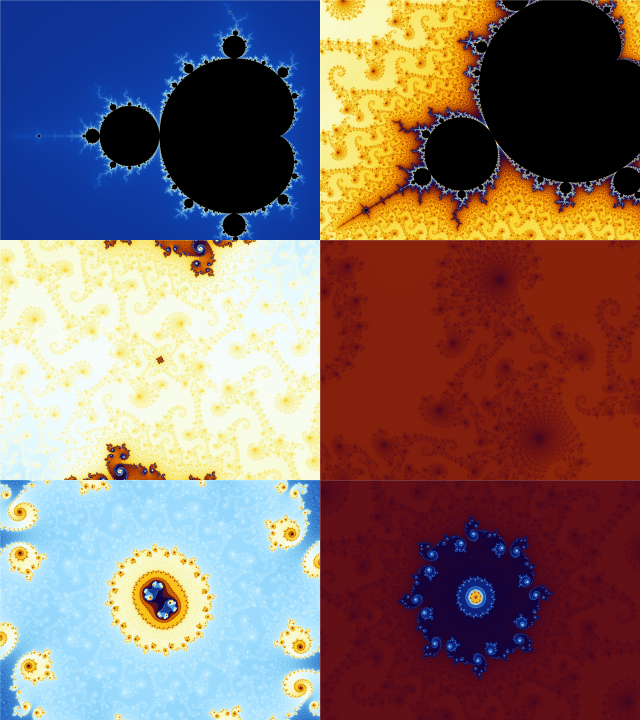
Based on differences in method and appearance, five mainstream
directions can be recognized:
1. Computer-generated painting
2. Raster painting
3. Manual vector painting
4. Combined and hybrid vector-raster painting
5. New photography



Raster painting
In raster painting, colors and lines are registered pixel by
pixel on the canvas. In procedure as well as appearance,
raster, 'grid' or 'bitmap' painting resembles most closely a
traditional painting with real brushes and paint. The image is
created on the screen in a stroke-by-stroke manner. All the
characteristics of the individual painter's hand are
preserved. The only digital trait is the flatness of the
physical carrier.
Problems with enlargement are the main disadvantage. Often,
the length and width of the creation is as small as a (mobile)
computer screen and the resolution as low as 72 dots per inch.
If the image is to be transferred to a physical carrier of a
customary size that can hang on the wall, it has to be
enlarged considerably. This generally entails manual
correction, a tedious and time consuming process. Manual
enlargement is a serious obstacle for printing and selling
raster paintings.
In recent versions of some raster painting programs,
'scripting' allows the painter to replay the brushstrokes on a
larger canvas on the desktop (see 'size, resolution,
enlargement')
Raster paintings are commonly stored as a BMP, JPEG, PNG, GIF
or TIFF file.

Vector painting
Together with hybrid- generated-painting and new photography,
vector is one of four directions that together create the new
visual language that has emerged since painters use a
computer.
What distinguishes vector from all other forms of digital
painting is that it uses the ability of the computer to
capture forms and lines in mathematical formulas. A French
engineer, Pierre Bézier, was the first to use the existing
mathematical framework to make visual representations. With
smooth ‘Bézier curves’ he designed new car models at Renault
around 1960. Since then, vector programs have become popular
in the world of design and advertising. Digital painters are
beginning to explore the medium.
The translation of shapes and lines into formulas offers
possibilities that cannot be achieved in any other way. Vector
images are size independent; they can be enlarged without loss
of resolution. Although the primary process is not very
spontaneous - pushing and pulling with a special instrument is
reminiscent of sculpture - once they are formed, shapes obey
one-click operations like change color, resize, emboss,
mirror, group, cast shadow, etc. This allows for an
unprecedentedly swift and intuitive method.
Vector paintings can be recognized by a certain minimalism and
a sharp definition of forms that is reminiscent of screen
prints and monochrome collages such as those by Matisse.
Colors are strictly monochrome or perfect gradients of two
colors. In the absence of a brush stroke, other aspects that
convey something of the maker’s mood or personality such as
atmosphere, palette, concept, choice of subject and
composition come to the fore. Since this is not the case with
all digital art, it should be noted that the artist has
complete control over the creative process.
Vector paintings are commonly stored as an EPS, PDF, WMF, SVG,
or VML file.

Mixed media and hybrid painting
Painting media are sometimes combined, either by using
different software for the same painting or by using a program
for hybrid painting. Vector-raster painting combines the
personal brush style of raster with the formula-based lines
and forms of vector. The use of different software offers
maximum contrast between sharp and soft and between the uni-
and duo-colors of vector and the broad palette of raster.
Other popular combinations are manual vector with computer
generated, and photography with raster or vector painting and
with computer 'generated'.
Some hybrid painting programs (e.g. ArtRage) use Bézier curves
in the background to smooth lines and curves of raster
paintings without intervention of the artist. The painting
procedure is spontaneous, stroke by stroke, and the storage
format is raster. The smooth, non-raster, non-vector
appearance reflects the hybrid basis. Smoothing mitigates the
loss of resolution and eases the task of enlargement when the
software does not offer scripting.


The relation between painting and photography is centuries old,
but never before has it been so close. To place a picture on a
digital canvas and transform it into a painting now requires
nothing but a push on a button, and a photographer today uses the
same software for editing and transforming a photo as the artist
for creating a painting. The shared toolbox entails changes in
painterly development (below) and creates a new transition zone
between painting and photography.
Filters
A variety of media filters can make photos or screenshots resemble
an oil painting, watercolor, wood-cut, etching, etc. Style filters
can put them in the visual framework of Seurat, Van Gogh, Pollock
and many others, while form filters create effects like circle,
wave, multiply, mirror, swirl and shear, or they can break up the
image in a kaleidoscope of geometric forms that radiate from a
central point in perfect symmetry.
Mixed media
While these transformations are push-button, they are often
part of a more complex method that combines several kinds of
photographic, computer-generated and painterly aspects in
subsequent stages. A possible workflow might be: a screenshot or
photo is taken, subjected to a transformation like a swirl and put
on the canvas as component of a painting. Applied as mixed media,
new photography makes an important contribution to contemporary
visual language.
Photo-based paintings are stored as raster files like BMP, JPEG,
PNG, GIF or TIFF.


When the artist increases the height and width of an existing image, its resolution or information density decreases and it will become vague. Resolution is usually expressed in dpi (dots per inch). While the image on the screen already looks sharp at the standard resolution of 72 dpi on the web, a physical carrier needs 300 dpi or more to look sharp. Moreover, the physical carrier is usually much larger in height and width as well.

For a vector painting, where colors and lines are controlled by
formulas, enlargement requires nothing but a push on a button.
There is no loss of resolution. For raster painting, information
will have to be added to fill in the gaps. This is done with the
help of enlargement software or by the 're-size' option in the
painting program. Automatic enlargement usually needs manual
corrections.
Although much progress has been made in automatic enlargement, it
remains difficult to fill in the empty space between handmade
lines and shapes. Lines become unsteady and crumbly and unintended
'noise' appears along the edges of color patches. The image above
shows two different types of online enlargement of the same
fragment of Pierre Bonnard's Getting
out of the bath. Note that each entails its own noise and
deformation.
In order to eliminate deformation and obtain a faithful
representation of the original, automatic enlargement is usually
followed by manual correction. Depending on the speed of the
computer and the chosen size and resolution of the image,
correction can be slow or even come to a halt. The screen, of
course, is not enlarged: the artist can no longer see the whole
image and has to zoom in and out, switching between corrections
and reviewing the results. Depending on the size of the file, the
slow and detailed process compares to fine needlework.
Recently, several programs for raster and hybrid painting
introduced ‘scripting’. Strokes and actions that compose the image
are recorded and can be repeated in an automated process and
without loss of resolution on a larger canvas on the desktop.

For artists and collectors alike, a faithful representation of
colors is of prime importance.
To see colors
Every computer screen deviates to some degree from the 'true'
colors that are set as a standard by the international color
convention (ICC). These deviations can be corrected by a
calibration of the screen. For anyone working with colors it is
necessary to calibrate the screen regularly. It is done with a
small sensor that calls up a number of colors on the screen,
compares them with the standard values and creates a monitor
profile which is automatically installed as the default. It runs
silently in the background and has only one task: to keep the
individual screen fixed to the standard. Although, confusingly,
this profile is listed between a whole range of optional profiles
for printing, it should be left alone. It is not embedded in an
artwork.
To create colors
In desktop painting software, the basic profile types have their
corresponding palettes and matching color spectrum in the
workspace. It is advisable to work in the palette and the spectrum
that matches the destination - CMYK for printing, RGB for online
display and grayscale for black and white. Changing RGB to CMYK
profiles is not (yet) possible on mobile devices.
To display and print colors
The artist should embed a color profile in the finished artwork
that matches one of two destinations: a webpage or a printing
company. This is important because the color palette for printing
is much smaller than the palette of a computer screen. If the
artist sends a painting to the printer that has the RGB profile
for online display embedded, every color that is not available
will in an automated process be translated to neighboring color
that can be printed. The result can be disappointing.
This is especially relevant for painters working on mobile apps
because they have the RGB profile embedded in their artworks. A
desktop painting program should be used to convert RGB colors to a
CMYK profile for printing. Most printing companies supply their
own profile, tailored to the machinery, ink and choice of paper.
They can also prescribe one of the CMYK profiles that are
available in most computers. Some accept files with the RGB
profile and convert them to their own CMYK profile.
Colors in browsers
Only 216 colors are standardized between browsers. The artist who
wishes to avoid online color deviation has the option to use the
'web safe color palette'. However this seriously limits the choice
of colors.
In conclusion, three things are needed to see and to represent
colors reliably:
(1) The screen should be calibrated.
(2) The artist should paint with the color palette that matches
the destination. If this is not possible, paint in RGB and convert
to CMYK before sending the work to the printer.
(3) The right profile should be embedded in the artwork, RGB for
digital destination and CMYK for a printing company.
Colors of prints at online
galleries
Galleries use RGB files for online presentation to offer physical
prints. The RGB color palette is used as it is or auto-converted
to the CMYK palette. Small or large color deviations are
inevitable, especially if bright or 'psychedelic' colors have been
used. If accurate color representation is important, the artist
can order a proof from the gallery before offering prints.
Approval of a proof can be mentioned in the description of the
painting.

Over the centuries art lovers have felt the hand and mood of the painter in brush strokes and paint. Many find that a painting without texture is fine in a book, but doesn't feel right on the wall. Though a stylus can be as sensitive to the pressure of the hand as a traditional brush, and the pressure can be made visible on the screen, a digital painting is entirely flat. Some artists accept flatness as a property of digital painting. Many print or project their work on a physical carrier and paint it over, thereby using the computer as a preparatory device and sacrificing the digital characteristics. Brushstroke gel is widely used to simulate brush strokes on a printed canvas.
In traditional painting, the numbering of a limited edition by
convention follows a quality/quantity notation 'i/n' in front of
the artwork. Where 'i' indicates a rough ranking of the individual
print according to technical and aesthetic quality and 'n' is the
size of the edition. Since all prints of a digital artwork are
identical, 'i' has no other meaning than to let a buyer know how
many prints are still available. The meaning of 'n' is still the
same: the size of a limited edition has economic significance for
collectors. As in traditional painting, the size of 'n' is set by
the artist prior to the first sale. The artist keeps register of
the number of copies that are sold. Open series are referred to as
'∞' and numerically unique prints as '1/1'. In the automated
printing process, the unnumbered run-up prints that are
traditionally labeled as 'E.A.' (epreuve artiste) or 'A.P.'
(artist's proof), can still occur.
A great variety of digital tools brings the artist new means to
express thoughts and feelings. On the negative side, the more the
computer facilitates their work by offering easy imports, taking
over painting processes and offering a wide array of styles and
transformations, the more difficult it becomes for painters to
develop their own idiom, to take distance from images that are
already created and to make the voice of the computer secondary to
their own.
The choice for an app narrows to some extent the development of
the artist by limiting him or her to the possibilities and the
style of the software. Development is a process of interaction.
Apart from making a considered choice, the risk that a software
developer will not keep up forward or backward integration or take
out and sell vital parts of the program should be taken into
account. In such a case paintings may no longer be available for
transfer or printing. Below is a famous example. Such dramas can
always occur, but the risk is reduced if the software is owned by,
and bought from, a company instead of an individual.
Brushes
A notorious case in the young history of digital painting is the
enlargement software that was part of the popular Brushes app for
raster painting. Brushes recorded all the painter's actions on the
iPad, which could then be repeated on a much larger canvas on the
Mac. Until 2012, Brushes was the only raster program that offered
enlargement without loss of resolution, a unique feature enabling
digital raster painters for the first time in history to show and
sell their work. David Hockney was the first well known painter to
surprise the art world with very large prints of raster paintings
made on the iPad. His exhibition 'A bigger picture' at the London
Royal Academy of Arts between January and April 2012 made Brushes
wildly popular.

In September 2012 Brushes' developer Steve Sprang abruptly
disabled the enlargement feature. Expressions of protest, anger
and despair at Flickr, Github and other forums could not remedy
that all paintings were trapped in the Brushes app at the size of
a postcard, unfit to print, exhibit or sell. A whole generation of
digital painters and teachers was forced out of Brushes, with the
exception it seems of David Hockney who continued production and
exposition of enlarged Brushes paintings uninterrupted, most
recently in a 2019 exhibition in the Amsterdam Van Gogh
Museum.
Shortly thereafter, another painting program, 'Procreate',
introduced high resolution enlargement for raster paintings. It
was the same method that Brushes had used, based on recording all
strokes and actions on a larger canvas. Once
more, high resolution enlargement was possible for raster
paintings. But
the interaction with any painting app creates a style of
its own. Apart from the
loss of their work,
often
the labor of many years, painters suffered a major
setback in painterly development when they had to replace
Brushes by another program.
Calibration
In order to eliminate the color bias of the individual screen, it
is important to regularly calibrate (see 'about colors').
Sample
Even with proper calibration, it is difficult to assess the look
and feel of a painting online. Colors to some extent vary with the
physical carrier of the artwork and with the type of screen of the
spectator. Moreover, many online colors in the online presentation
simply can not be printed at all, even with the right color
profile embedded. The best way to judge a digital painting is by a
sample. It should have at least the size of a postcard, be printed
on the chosen physical carrier (paper, acrylic glass, aluminum
etc.) and executed with the same resolution and by same printing
company that prints the final artwork.
Browsing online galleries
Collecting digital art starts with browsing and research. To
browse the many online portfolios is not yet as easy and pleasant
as it can be. There is a great deal of room for improvement in
search algorithms. At the time of writing the search process has
several serious limitations.
- Limitations by choice
Galleries with 'follow me' and 'thumbs-up' features rank artists
by their number of followers, number of likes, and number of
paintings in their portfolio. The artistic value thus measured
results in increased visibility for some and decreased visibility
or invisibility for others in search results. Though stars and
thumbs are a common way to valuate all kinds of products,
application to art and literature is an issue. Some critics have
posited that the acquisition of thumbs-up and likes is not an
indication of artistic quality but of social media skills.

- Limitations by lack of information
Despite the invitation at some galleries to filter for mainstream
digital media like ‘vector’, ‘raster’, 'fractal', 'new
photography' etc., as yet few are able to live up to promise. It
should be realized that a collector usually does not know the name
of the artist. Therefore, if the medium search key doesn't
function properly, artists remain invisible. The quality of a
search machine is easily assessed from the results. If it is good,
a more or less homogenous catch of paintings in a particular
medium is brought up. If it presents an incoherent mix of all
kinds of digital and non-digital media, there is a visibility
issue. Search results can be supplemented at other galleries and
Google images.
Information about the software that is used to create the painting
is seldom available. In order to appreciate originality and
technical skill, to distinguish what comes out of the app from
what comes out of the artist and perhaps to judge if art claims
are justified, some collectors would probably like to know which
program was used to create the painting. (Visit Ben Guerette's A
Blog appArt for a wild variety of styles and
technical skills that are a property of the software.)
Information about resolution or the number in a limited edition
are also often not yet included in artwork descriptions.
- Other limitations
Search results are often dominated by large numbers of images by
only a few painters. If collectors tire from so much homogeneity
and decide to resume at another time they will have to go through
the same images again.
Some galleries lower the resolution of paintings to speed up
browsing, which results in blurred images. While frustrating to
artists, it deprives collectors of the more time-efficient method
of judging sharp small-size images at first sight.
Buying
It remains important to buy from a trusted party. While most
digital painters are still alive, their work can be bought
directly at their website or at online galleries where they show
their portfolios.
Buying directly from the artist has pros and cons. The color
quality of the print is a pro, if the artist will embed a proper
CMYK color profile for printing, make corrections when needed and
has the work printed at a professional printing company. Galleries
use the RGB files for online display for printing, with small or
larger color deviations. On the other hand it is not easy for
individual artists to match the attractive display and
professional framework with safe payment, delivery and sales
conditions that galleries offer.
If features like an approved color proof, a sample, a manual
signature, protection against duplication and a certificate are
not mentioned in the description of the artwork, the collector can
ask the artist to make these provisions. For prints that are
produced by the gallery, a signature and a barcode or other
protective measure can usually be arranged by having the artwork
sent through the artist.
The market for digital art is gradually maturing. Collectors
start to realize that digital painting is a new visual language
that can't be expressed with traditional means. Many problems have
been solved. Color representation has become fairly reliable
thanks to calibration and the use of color profiles. Digital and
physical asset management and a responsible handling of digital
files have brought the risk of duplication down to an acceptable
level. Slowly but steadily, digital paintings are finding their
way to museums, auctions and galleries where they meet a new
generation of collectors.
Yet many highly professional, even pioneering digital painters
lack the technical know-how to get their work out of the computer
and into the real world. Most rely on an online gallery. The
larger galleries offer an abundance of originals and limited
edition quality prints worldwide with good sales conditions. This
relieves artists of technical concerns. On the negative side, if
printing is left to the gallery and the print sent directly to the
collector, the artist can no longer evaluate and if necessary
adjust the (color) representation. Physical asset management such
as a manual signature is somewhat more complicated, and the
computer of the artist is no longer the only location where a high
resolution file of the painting is stored.
A certificate is a document that bears a mark of identity such as the signature of the artist, often supplemented with a personalized sign, watermark, bar code, fingerprint or hologram which matches an identity mark on or in the artwork. It contains a copyright declaration, distinguishes between an original and an open or closed edition, states the size of a limited edition, binds the artist to deletion of the digital carrier after the sale, and conditions the display of the artwork after it is sold. A Certificate of Unicity for a numerically unique print ('original' or '1/1') a Certificate for a Limited Edition and a Certificate for an Open Edition is regularly updated and freely available on this site.
Brushstroke gel: Water-soluble acrylic polymer
containing a UV inhibitor which helps protect a painting from
yellowing and fading. Also used to recreate brushstrokes on
digital paintings printed on canvas. http://www.artandframingsolutions.com/BrushstrokeGel.htm
Blogs:
Don
Archers blog, Digital art, artists and commentaries
Color calibration:
General
information
Spyder
calibration sensor
Carriers for digital painting:
Xpozer, Prints on polyester
coated paper, floating, unframed mount (sRGB profile accepted)
Whitewall,
Prints on Hahnemuele paper, canvas, aluminum, dibond, perspex,
(printer's color profile supplied)
Drukwerkdeal,
Postcards, large format prints on dibond and brushed aluminum,
postcards (printer's color profile supplied)
Certificates:
Certificates
For original, limited and open edition
Conversion:
Automatic
conversion, photos to paintings, drawings and cartoons
Waterlogue,
Automatic conversion of photos to paintings, drawings and cartoons
Enlargement, digital:
Many programs listed
Oneone
perfect resize, (enlargement correction)
ZoomPro5, Ben Vista
Enlargement, manual (projection of physical and
digital image on walls, canvas etc.):
Artograph
Beamers (choose a led beamer to work in daylight)
Fractal art:
Fractal
art, video1
Fractal
art, video2
Fractalart
Galleries, online:
Absolute Arts
Flickr
Gaac
MOCA
Saatchi online
Galleries, physical:
Agora West 25th
Street, New York, NY)
K16 Keizersgracht 16, 1015
CP Amsterdam, NL)
Hand painted copies:
Dafen Village,
China: By artist, style, size
Mark, barcode, digimark, hologram (print and digital
image protection):
Barcode
registration GS1
Digimark (invisibly
embedded watermark with tracing option, a Photoshop plug-in)
Security
hologram
Museums:
MOCA Museum of
Computer Art (MOCA) of New York State University offers emerging
directions in digital art an online platform since 1993. Annual
juried competition in digital art, catalogue.
Photo art and artist portfolio:
Flickr
Programs for painting on iPad and iPhone:
Brushes (raster)
(for online display only, enlargement feature for printing no
longer available)
Adobe
Eazel (raster) (no undo option)
Adobe
ideas (vector) (in combination with Adobe Illustrator)
Paintbook
Penultimate
ArtRage (hybrid,
with scripting)
Procreate (enlargement
for printing, max. canvas depends on device)
Inkpad
(vector, some features no longer available, low resolution for
PNG and jpg export)
Programs for painting on PC and Mac:
Overview
Adobe
Photoshop CS6
Corel drawing
Programs for computer generated painting:
Fractal Arts
FractalScapes (iPad)
Fractoscope (L-systems, iPad)
ImageSynth (Stochastic rules iPad)
Programs for vector painting:
Overwiew
of vector programs and file formats
Adobe
Illustrator
Adobe
ideas (iPad) (in combination with Adobe Illustrator)
Inkscape(open
source, desktop)
Photoshop.com
CorelDraw for
Windows
Registration:
For artwork on paper
Style:
A
Blog appArt, An overview of styles and features of apps
and painting software by Ben Guerette
Vector art:
vector art,
video
Pno expo
Blood
sweat vector
Vectorization, online (raster to vector conversion):
Vectormagic
Autotracer
2013-2019 DigitalPainting.be Amsterdam - Gent

2020/09/08
There is now a book available with the highlights of
this website.
Look inside
Buy
2020/05/27
Update of Differences in method:
Spontaneity,
Creative influence
Update of Prints and screen
representation
2020/05/18
Update of 'visual characteristics'.
2019/11/18
Update of 'vector painting'.
2019/10/25
Update of 'Painterly development' with 'Brushes'.
2019/04/13
Update of 'New Photography', update of 'Collecting,
browsing online galleries'. Update of 'DP, brief
overview'.
2019/04/10 Update of 'Digital
painting and photography'. Update of 'Collecting digital
art, assessment'. Update of 'Differences in method.'
Update of 'Digital painting and photography'. Added
images.
2019/04/04 Update of 'Computer generated painting'.
Update of 'Differences in method'. Update of 'Collecting
digital art, assessment'.
2019/02/12 Update of 'Visual characteristics'. Added tip
jar.
2018/12/18 Update of
'Protecting originals and limited editions'
2018/11/28 Text corrected and modified
2018/03/13 The text dedicated into the Public Domain
2017/09/13 New certificates (version 5.0)
2017/08/30 Update of 'Characteristics'; 'Uniqueness and
limited editions'; 'Links'
2017/08/22 Update of 'detailed survey'
2017/08/14 Update of 'brief overview'
2015/08/08 New certificates: (v.4 for originals, v.1 for
editions)
2015/08/06 Update 'Market for digital art'
2015/08/03 'About color'
2015/05/21 'File formats'
2015/05/01 'Pioneering digital artists'
2015/04/25 'Visual characteristics'
2015/04/19 'Assessment'
2015/04/1 Content of blog 'Digital Painting' transferred to this webpage